
MC1560922 High Major change
Microsoft Copilot: In-app browsing will be enabled by default in the desktop app
Summary AI-generated
In-app browsing in Microsoft Copilot desktop app will be enabled by default, allowing users to open websites shared in Copilot chat directly within the app.
Suggested actions AI-generated
- Set BrowsingEnabled policy to Off to disable in-app browsing
- Configure in-app browsing policies for security, privacy, access, authentication, network, downloads, and permissions
Written by Azure OpenAI (gpt-4.1) from the text of the post below. It can be incomplete or wrong; the original post is authoritative.
Similar posts
Search for more like this-
MC1474455 In-app browsing in Copilot app
In-app browsing in Copilot app Microsoft Copilot app for Windows and Mac now supports in-app browsing of shared websites in chat via a side pane; admins can opt-in managed devices to test this feature. [What and why:] We are adding support to the Microsoft Copilot app, in Windows and Mac, to allow websites that Copilot shares in chat to open.
-
MC1421919 (Updated) Web content setting in Microsoft 365 Copilot expands across Copilot experiences and moves to Settings
(Updated) Web content setting in Microsoft 365 Copilot expands across Copilot experiences and moves to Settings The Web content search preference for Microsoft 365 Copilot is expanding to Copilot Chat and moving to a centralized, persistent setting across supported clients, giving users more control. Updated July 20, 2026: We have updated the.
-
MC1552386 Microsoft 365 Copilot: Page context for open tabs in the Copilot desktop app built-in browser
Microsoft 365 Copilot: Page context for open tabs in the Copilot desktop app built-in browser Copilot desktop app will use content from open webpage tabs in its built-in browser as page context for answers and summaries, enhancing multi-tab workflows. [What and why] Copilot in the desktop app will be able to use content from open webpage tabs in.
-
MC1434583 Microsoft 365 Copilot: Configure organization policy link for blocked Copilot Chat users
Microsoft 365 Copilot: Configure organization policy link for blocked Copilot Chat users Admins can now provide a custom policy link for users blocked from Copilot Chat, directing them to organization-specific guidance instead of a generic message. [What and Why] We are introducing a new capability for organizations to provide a link to company.
-
MC1474461 Browser Use Admin Control for Copilot Cowork
Browser Use Admin Control for Copilot Cowork Admins can now manage Copilot Cowork browser access via Microsoft 365 admin center with granular controls for specific users or groups, allowing targeted pilots and flexible rollout. [What and why:] Controls for browser use in Copilot Cowork are now available in the Microsoft 365 admin center (MAC). As.
-
MC1515930 Cowork browser use setting renamed to Browser use in Microsoft Copilot
Cowork browser use setting renamed to Browser use in Microsoft Copilot The Cowork settings panel in Copilot Settings is being renamed to Browser use in Microsoft Copilot for easier discovery. No change to functionality or existing configuration. [Introduction] We’re renaming the Cowork settings panel in Copilot Settings to Browser use in.
Original post from Microsoft
[What and why]
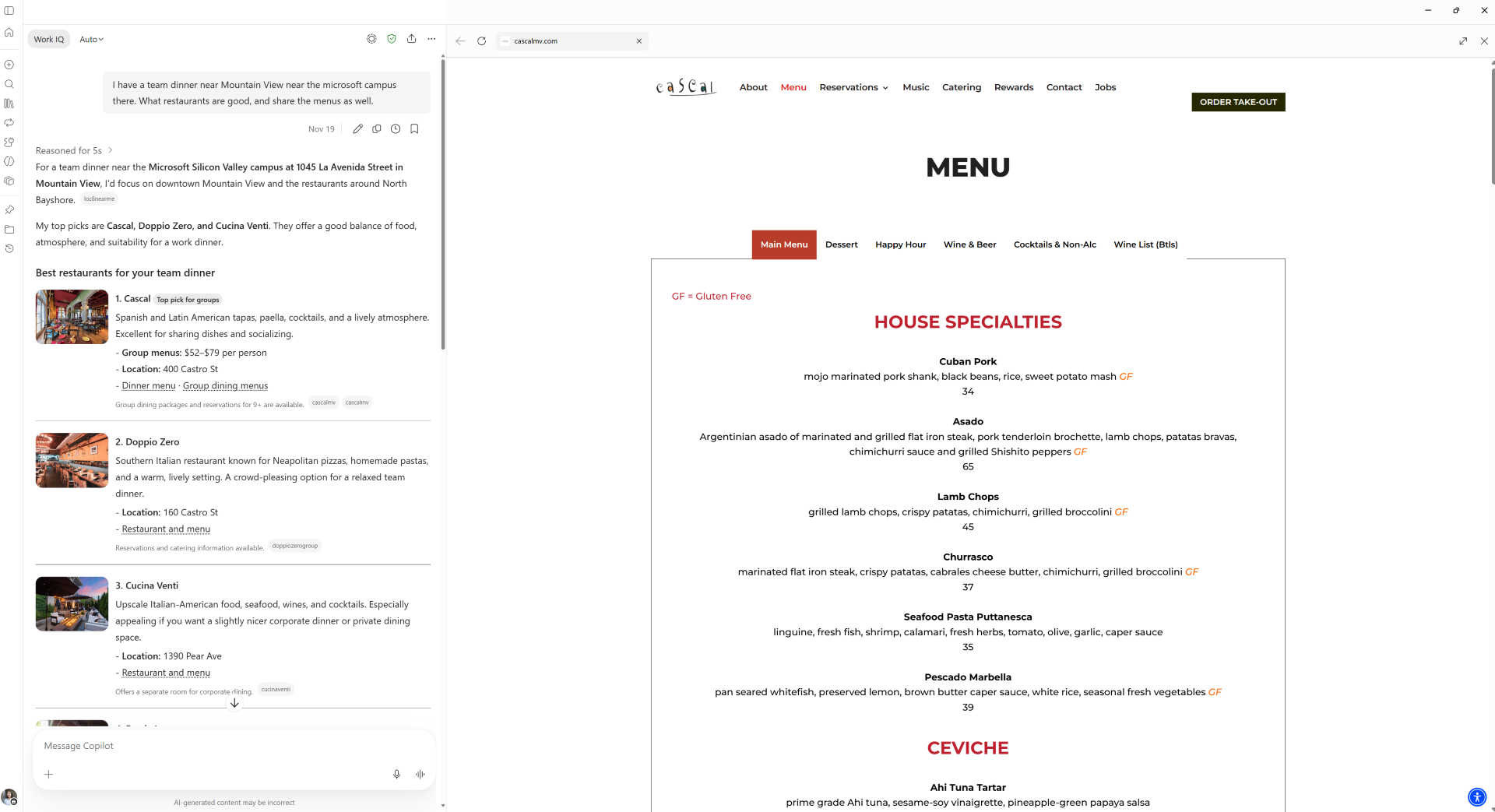
We are enabling in-app browsing by default in the Microsoft Copilot desktop app for Windows and Mac. As we announced in MC1474455, this feature allows users to open websites shared in Copilot chat directly within the desktop app, side by side with their Copilot conversation. Previously optional, this experience will be enabled by default, helping users access web content and Copilot responses in one place and reduce context switching.
[Rollout schedule]
- General Availability (Worldwide): Rollout will begin in early January 2027 and is expected to complete by the end of January 2027.
[Impact on your organization]
Who is affected
- Users of the Microsoft Copilot desktop app for Windows and Mac.
Platforms and services
- Microsoft Copilot desktop app for Windows and Mac
What will happen
- Websites shared in Copilot chat will open directly within the desktop app by default, side by side with the Copilot conversation.
- Users can view web content and Copilot responses in one place, reducing context switching.
[Action required and recommendations]
No action is required to enable in-app browsing. If your organization wants to disable or manage this experience:
- Set the
BrowsingEnabledpolicy to Off through your device management system to disable in-app browsing. - Configure the new in-app browsing policies as needed to manage security, privacy, access, authentication and network behavior, downloads, and permissions.
If no changes are made, in-app browsing will remain enabled by default.
[Learn more]
We will update this message with updated documentation.
[Compliance considerations]
No compliance considerations identified. Review as appropriate for your organization.
Additional details from Microsoft
- Summary
- Microsoft Copilot desktop app will enable in-app browsing by default starting January 2027, allowing users to open websites shared in chat within the app alongside conversations. No action is needed unless organizations want to disable or manage this feature via policies.