
MC1434583 Low
Microsoft 365 Copilot: Configure organization policy link for blocked Copilot Chat users
Summary AI-generated
Admins can now provide a custom policy link for users blocked from Copilot Chat, directing them to organization-specific guidance instead of a generic message.
Suggested actions AI-generated
- Review Copilot access policies in Integrated Apps
- Decide whether to provide guidance for restricted users
- Configure a URL in Copilot settings if desired
- Prepare helpdesk/support teams for the new user experience
- Review updated Microsoft Learn documentation when available
Written by Azure OpenAI (gpt-4.1) from the text of the post below. It can be incomplete or wrong; the original post is authoritative.
Similar posts
Search for more like this- MC1396361 Microsoft 365 Copilot: Publish organization prompts to Copilot Chat
- MC1454386 Simplified access to Copilot Chat on the Microsoft 365 Copilot mobile app
- MC1262570 (Updated) Microsoft 365 Copilot: Updates to license request custom flow
- MC1486291 Microsoft 365 Copilot: new guided Copilot onboarding experience
- MC1463507 Copilot Chat policy management moving from Billing & Usage to Cost Management in the M365 admin center
- MC1197289 (Updated) Chat visibility in the Microsoft 365 Copilot App
Original post from Microsoft
[What and Why]
We are introducing a new capability for organizations to provide a link to company policy or internal guidance for users who are blocked from accessing Copilot Chat in the Microsoft 365 Copilot app. When restricted users attempt to access Chat, they can be directed to organization-specific information through a policy link. This helps organizations provide clearer guidance, reduce user confusion, and direct users to appropriate next steps.
[Rollout Schedule]
General Availability (Worldwide): Beginning in July 2026 and expected to complete in August 2026
[Impact on your organization]
Who is affected
- Organizations using the Microsoft 365 Copilot app
- Admins managing Copilot access using Integrated Apps policies
- Users who are blocked from Copilot Chat via admin policy
Platforms/services
- Microsoft 365 Copilot app
What will happen
- Users who are restricted by policy will continue to see the Chat entry point in the Microsoft 365 Copilot app navigation.
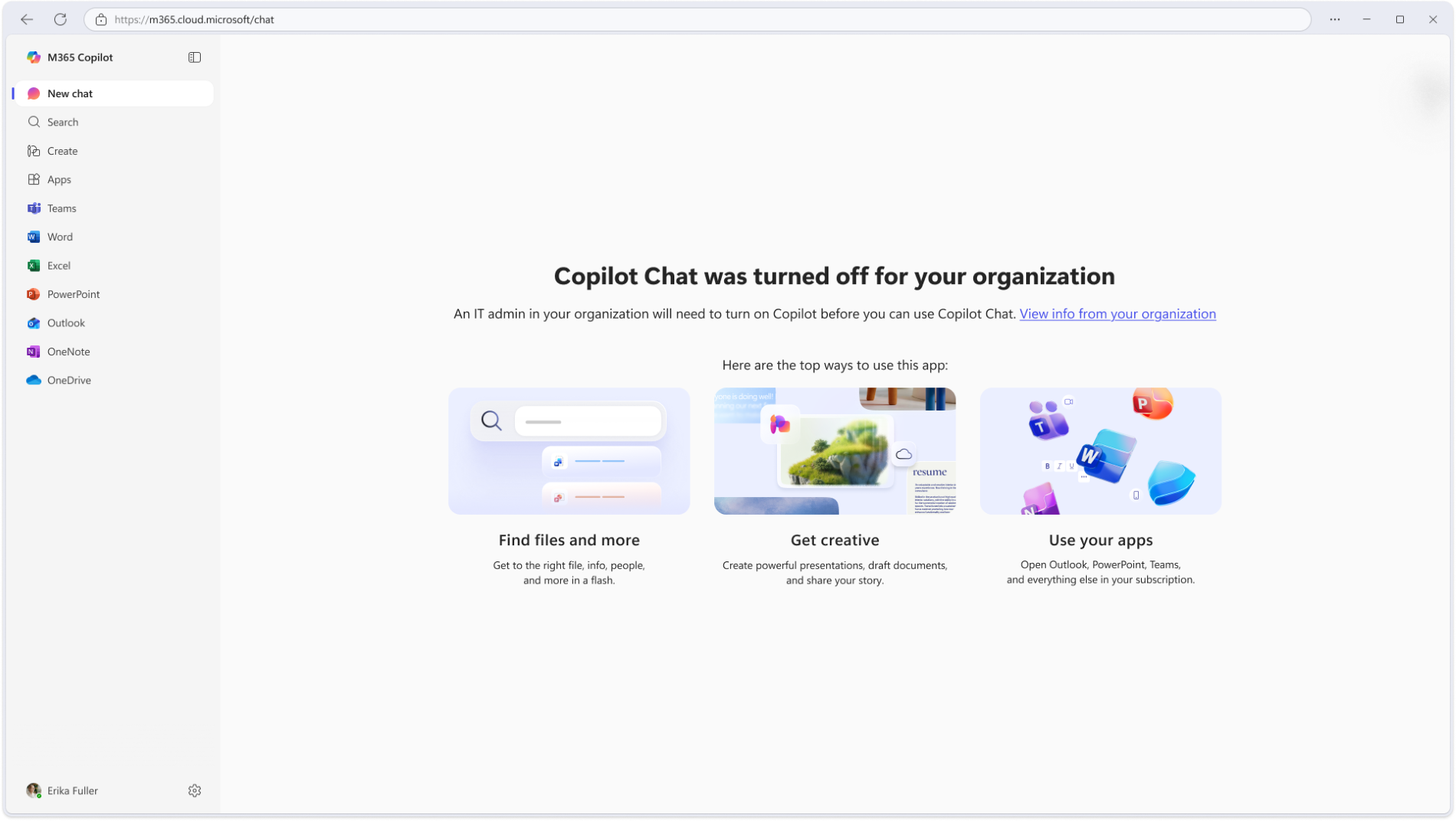
- When restricted users select Chat or access Chat directly by URL, they will see a message indicating that Copilot Chat is unavailable:
- By default, users will see a standard Microsoft message when access is blocked.
- Admins can optionally add a URL to provide guidance or next steps.
- The optional support link will display as “View info from your organization.”
- This feature is available for admins to configure and is not enabled by default.
- Existing Integrated Apps policies continue to control access and are not changed by this feature.
[Action required/Recommendations]
No action is required.
If you want to customize the experience for restricted users:
- Review Copilot access policies in Integrated Apps.
- Decide whether to provide guidance or support resources for restricted users.
- Configure a URL in the Microsoft 365 admin center under Copilot settings
- Prepare your helpdesk or support teams for this updated user experience.
- Review upcoming Microsoft Learn documentation for detailed configuration guidance.
Learn more: [To be updated closer to GA launch.] Manage harmful content protection settings for Microsoft 365 Copilot Chat | Microsoft 365 Copilot | Microsoft 365 | Microsoft Learn.
[Compliance considerations]
| Question | Answer |
| Does the change include an admin control and can it be controlled through Entra ID group membership? | Yes. Admins can configure the URL through Copilot settings in the Microsoft 365 admin center. |
Additional details from Microsoft
- Summary
- Starting July 2026, Microsoft 365 Copilot will let admins add a custom policy link for users blocked from Copilot Chat, providing organization-specific guidance. This feature is optional, configurable via the admin center, and does not change existing access policies. No action is required.