
MC1454378 High
(Updated) Microsoft 365: The Next Generation of File & Folder Sharing
Summary AI-generated
Microsoft 365 introduces the hero link, a unified sharing link to simplify, secure, and streamline file/folder collaboration across SharePoint and OneDrive.
Suggested actions AI-generated
- Review sharing guidance and documentation
- Communicate new sharing experience to users
- Evaluate site-level default sharing settings
Written by Azure OpenAI (gpt-4.1) from the text of the post below. It can be incomplete or wrong; the original post is authoritative.
Similar posts
Search for more like this- MC1457226 Microsoft OneDrive: Refreshed file browsing and filtering experience in OneDrive Web
- MC1393812 OneDrive: Improved Shared file experience on mobile
- MC1240699 (Updated) Introducing the new SharePoint experience
- MC1188228 (Updated) Microsoft 365 Copilot: Summarize and share OneDrive files in Windows using Copilot
- MC1188599 (Updated) Microsoft 365: Modern Access Request and Access Denied web page
- MC1179160 (Updated) Microsoft 365 Copilot (web and mobile): Sharing Copilot Notebooks and mobile app rollout
Original post from Microsoft
Updated October 7, 2026: We have updated the timeline. Thank you for your patience.
[What and why:]
We're introducing the third-generation Microsoft 365 sharing experience to make collaboration simpler, smarter, and more secure by default. At the center of this update is a new hero link—a single sharing link that controls access to a file or folder.
Users will see one consistent sharing experience whether they copy a link, share through email, or use the browser URL. The hero link consolidates sharing controls into a single link that can be updated after it has been shared, reducing the need to create and resend new links when access requirements change.
[Rollout schedule:]
- General Availability (Worldwide, GCC, GCC High, DoD): Rolling out early October 2026 (previously mid-September) through end of November 2026 (previously late October)
[Impact on your organization:]
Who is affected: All users who share or manage files and folders in Microsoft 365.
Platforms and services: SharePoint, OneDrive, and Microsoft 365 file-sharing experiences.
What will happen:
- Every file and folder will have a single primary sharing link, called the hero link, displayed in the sharing dialog.
- The hero link settings determine who can access the item beyond people who are explicitly granted access.
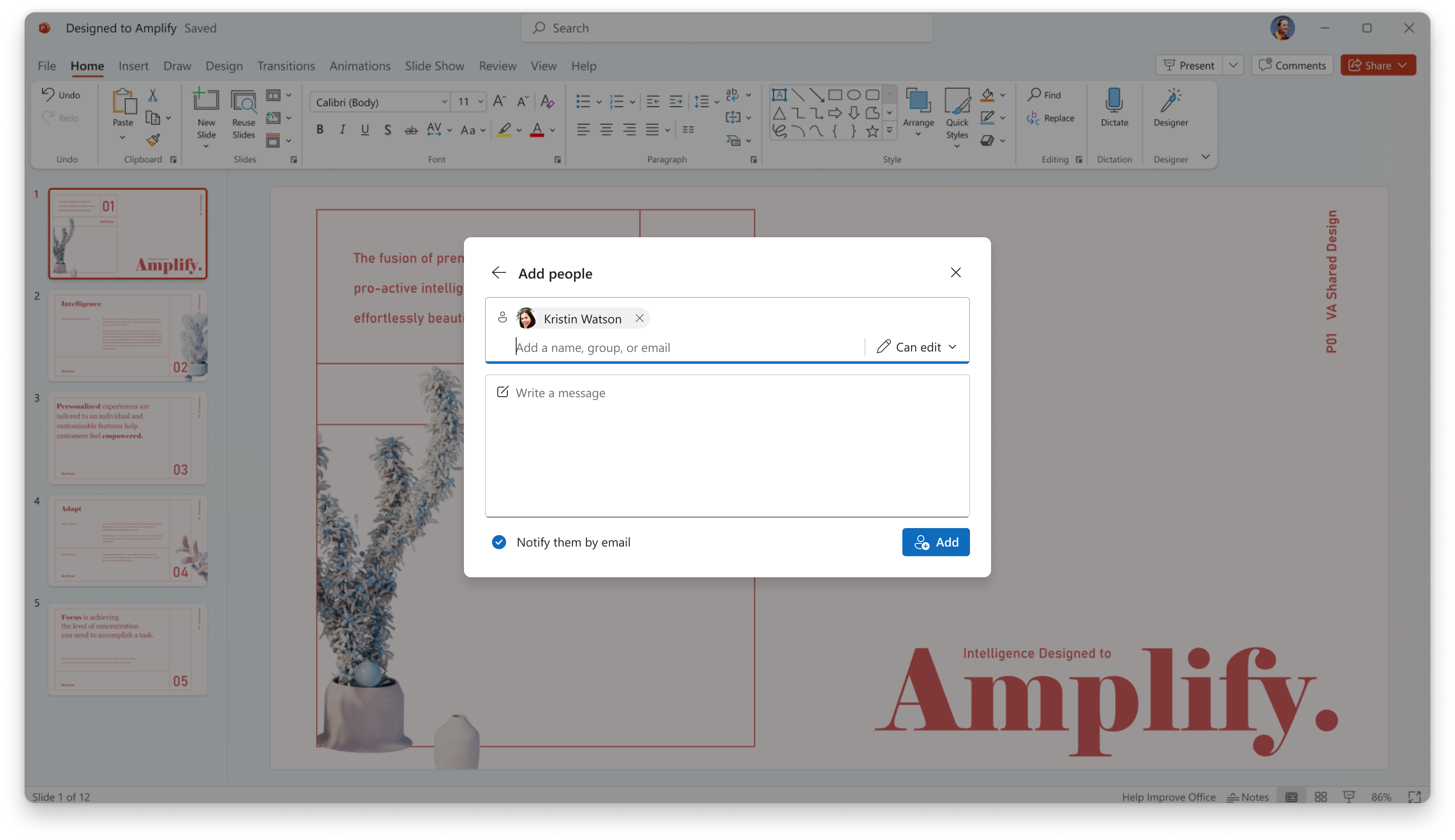
- Adding people directly to a file or folder remains unchanged and continues to be the simplest way to share content.
Screenshot - Add people screen when sharing
- By default, the hero link is set to Only people added to the file, meaning the link itself does not grant access to anyone.
Screenshot - Share file view with hero link
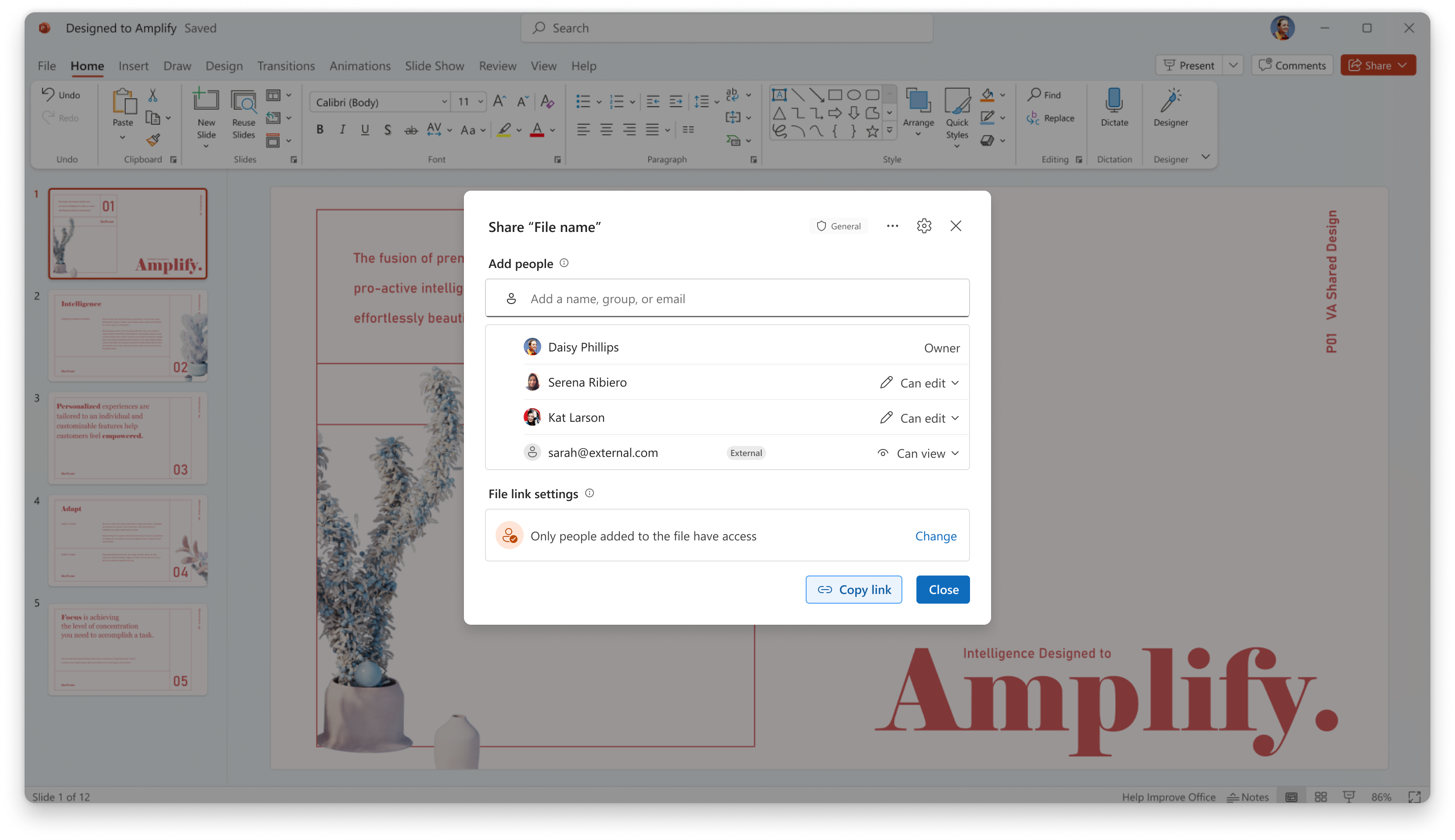
- Users can broaden access to people in the organization with the link or, where permitted by organizational policy, to anyone with the link.
- Users can choose whether recipients can view, edit, or view without downloading, depending on available permissions.
- Changing the audience for the hero link updates the existing link rather than creating a new one.
- If recipients cannot open a previously shared file, the sender can expand access on the same hero link without redistributing a new URL.
- Existing sharing links will continue to function and will appear under Other links in the sharing dialog.
- Effective access remains the most permissive combination of direct permissions, inherited permissions, group-based permissions, and link-based permissions.
- Users will see a tutorial experience upon opening the new share dialog for the first time.
[Action required/Recommendations:]
No action is required before rollout.
Organizations should consider the following preparation activities:
- Review internal sharing guidance and end-user documentation to reflect the new single-link sharing model.
- Communicate the updated sharing experience to users who regularly collaborate across teams and organizations.
- Evaluate site-level default sharing settings where different sharing behaviors are required.
Learn more:
- Walkthrough Video: https://www.youtube.com/watch?v=3RpE0KrQmcA&t=4s
- Announcement Blog: https://techcommunity.microsoft.com/blog/onedriveblog/simple-smart-and-secure-the-next-step-in-sharing-files-in-microsoft-365/4411655
Admin controls
- Administrators can configure the default audience for the hero link at the SharePoint site collection or OneDrive level by using the DefaultMainLinkScope parameter in SharePoint PowerShell.
- Supported values are:
- OnlyPeopleAdded (default)
- Organization
- There is currently no tenant-wide equivalent setting for the hero link audience.
- DefaultMainLinkScope controls only the default audience and does not prevent users from broadening access when allowed by policy.
- Hero links start with view permissions by default.
- Existing default sharing link settings and link expiration policies continue to apply to legacy links and do not govern hero links.
[Compliance considerations:]
No compliance considerations identified, review as appropriate for your organization.
Additional details from Microsoft
- RoadmapIds
- 492622
- Summary
- Microsoft 365 introduces a third-generation sharing experience with a single "hero link" for files and folders, simplifying access control and updates. Rolling out worldwide from October to November 2026, it affects SharePoint, OneDrive, and Microsoft 365 sharing, with no required user action before rollout.
- Platforms
- Android, Desktop, iOS, Mac, Web