
MC1404326 High
(Updated) Microsoft 365 admin center: New usage report for Copilot connectors
Summary AI-generated
A new Copilot connectors usage report is coming to Microsoft 365 admin center, providing insights for admins on connector adoption and usage across Copilot experiences.
Suggested actions AI-generated
- Inform relevant administrators and analytics stakeholders about the new report
- Review the report after rollout to assess Copilot connector adoption and usage trends
- Update internal documentation if Copilot reporting is referenced
Written by Azure OpenAI (gpt-4.1) from the text of the post below. It can be incomplete or wrong; the original post is authoritative.
Similar posts
Search for more like this- MC1148545 (Updated) Microsoft 365 admin center - Usage reports: Agent usage (preview)
- MC1423101 M365 Copilot usage reports – updated reporting experience, faster refresh, and more Copilot usage metrics in Graph API
- MC1447677 Microsoft 365 Copilot: Unified management experience for connectors in the Microsoft 365 admin center
- MC1187780 New experiences for Copilot management in Microsoft 365 admin center
- MC1069563 Microsoft 365 admin center: Usage reports to manage metered consumption costs for Microsoft 365 Copilot Chat (preview)
- MC1314949 (Updated) Microsoft Viva Copilot Analytics: Daily Copilot usage snapshot with fresh data
Original post from Microsoft
Updated October 16, 2026: We have updated the timeline. Thank you for your patience.
[Introduction]
To help administrators better understand and manage adoption of Copilot connectors, Microsoft is introducing a new Copilot connectors usage report in the Microsoft 365 admin center. This report provides visibility into how connectors are used across Microsoft 365 Copilot experiences, helping organizations assess adoption, identify usage patterns, and optimize connector deployment.
This update supports customer feedback requesting clearer reporting on Copilot connector usage across entry points such as Copilot Chat, Search, and agents.
This message is associated with Microsoft 365 Roadmap ID 519571.
[When this will happen:]
- Public Preview (Worldwide): We will begin rolling out late June 2026 and expect to complete by early July 2026.
- General Availability (Worldwide): We will begin rolling out November 2026 (previously late September) and expect to complete November 2026 (previously end of September).
[How this affects your organization:]
Who is affected:
- Microsoft 365 administrators
- Organizations using Copilot connectors with the Microsoft 365 Copilot app
- A Microsoft 365 Copilot (Premium) license is required to use this feature
What will happen:
- A new “Connectors” report will appear in Microsoft 365 admin center under Reporting > Usage > Microsoft 365 Copilot > Connectors.
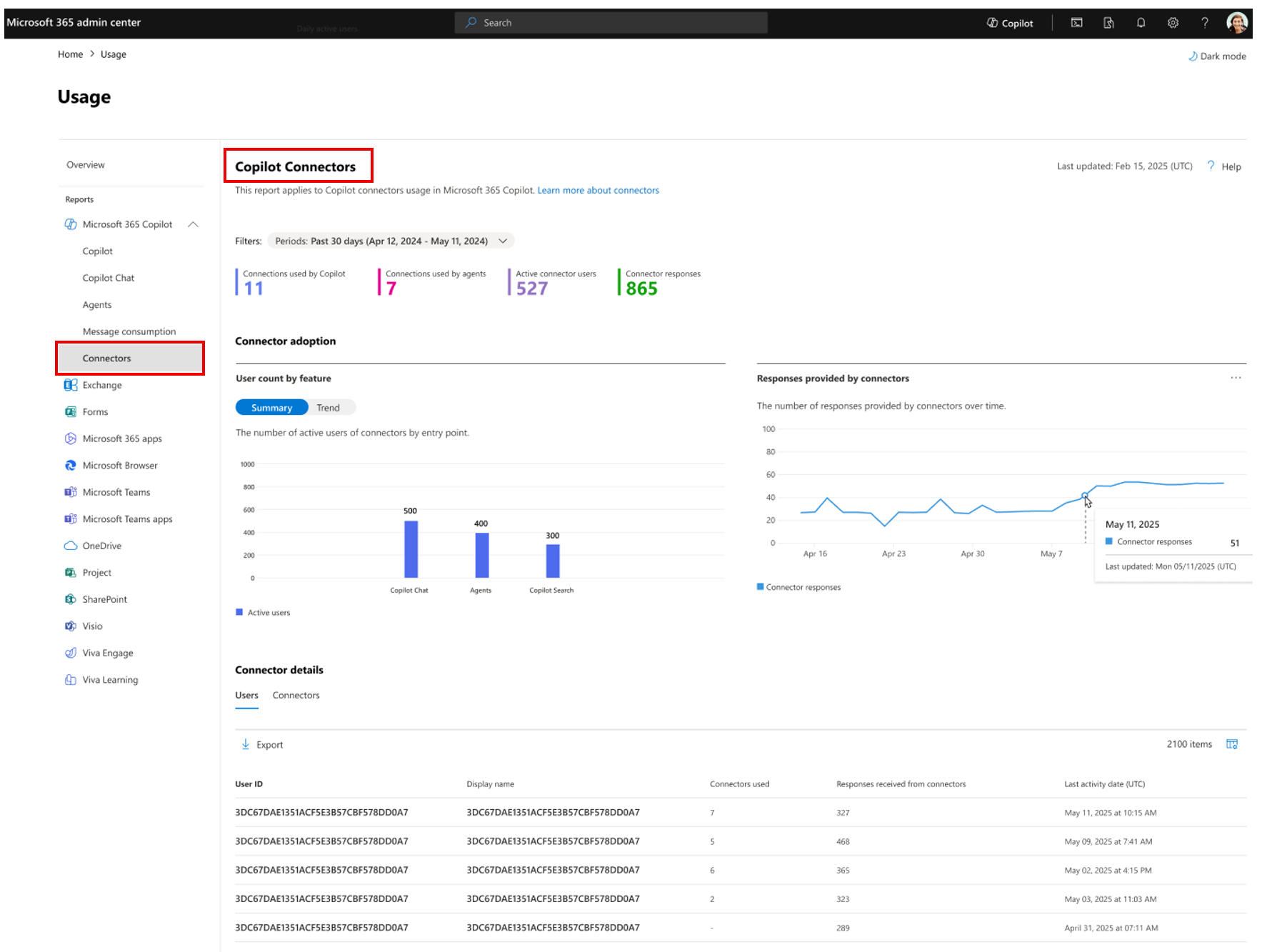
- The report will show:
- Active users of connectors across Copilot Chat, Copilot Search, and agents
- Total connector responses generated in the organization
- Daily trend views of active usage and total responses
- Usage breakdown per user and per connector
- The report is enabled by default and respects existing permissions.
- There is no impact to user workflows.
[What you can do to prepare:]
No action is required before rollout.
- Inform relevant administrators and analytics stakeholders about the new report.
- Review the report after rollout to assess Copilot connector adoption and usage trends.
- Update internal documentation if Copilot reporting is referenced.
Learn more: Copilot connectors usage report documentation
[Compliance considerations:]
This change introduces a new admin usage report that improves visibility into Copilot connector usage. No other compliance considerations are impacted.
Additional details from Microsoft
- RoadmapIds
- 519571
- Summary
- Microsoft 365 will introduce a new Copilot connectors usage report in the admin center by November 2026, showing usage across Copilot Chat, Search, and agents. It requires a Copilot (Premium) license, is enabled by default, and helps admins track adoption without impacting user workflows.
- Platforms
- Android, Desktop, iOS, Mac, Web