
MC856756 High
(Updated) Microsoft Teams Rooms on Windows: Native PTZ controls
Summary AI-generated
Teams Rooms on Windows will soon support native PTZ camera controls in Camera settings; rollout starts late September 2026, with admin toggling and default-on.
Suggested actions AI-generated
- Notify users about new PTZ camera controls
- Update supporting user documentation
Written by Azure OpenAI (gpt-4.1) from the text of the post below. It can be incomplete or wrong; the original post is authoritative.
Similar posts
Search for more like this- MC1459138 (Updated) Microsoft Teams: Local Pan-tilt-zoom (PTZ) controls for Microsoft Teams Rooms on Windows
- MC1442614 (Updated) Microsoft Teams: Enhanced IntelliFrame with AI data channel for intelligent cameras
- MC1317197 (Updated) Microsoft Teams: A refreshed in-meeting experience with simpler controls and a smarter share panel
- MC1182706 (Updated) Microsoft Teams Rooms: Front-of-room view control for Town Halls on Android
- MC1319216 (Updated) Microsoft Teams: In‑meeting toggle to turn Meeting AI on or off
- MC1443520 (Updated) Microsoft Teams: Specify who has control of production tools in meetings and webinars
Original post from Microsoft
Updated September 15, 2026: We have updated the timeline. Thank you for your patience.
Microsoft Teams Rooms on Windows will soon support native PTZ (pan-tilt-zoom) controls for cameras capable of supporting PTZ controls. The PTZ controls will appear in the Camera settings pop-up menu when the Enhanced Framing toggle is set to off.
This message is associated with Microsoft 365 Roadmap ID 409534.
[When this will happen:]
General Availability (Worldwide, GCC): We will begin rolling out late September 2026 (previously mid-September) and expect to complete by early November 2026 (previously late July).
General Availability (GCC High, DoD): We will begin rolling out early December 2026 (previously mid-October) and expect to complete by early January 2027 (previously mid-November).
[How this will affect your organization:]
Before this rollout: Native PTZ controls are not displayed in Camera settings pop-up menus for PTZ-capable cameras.
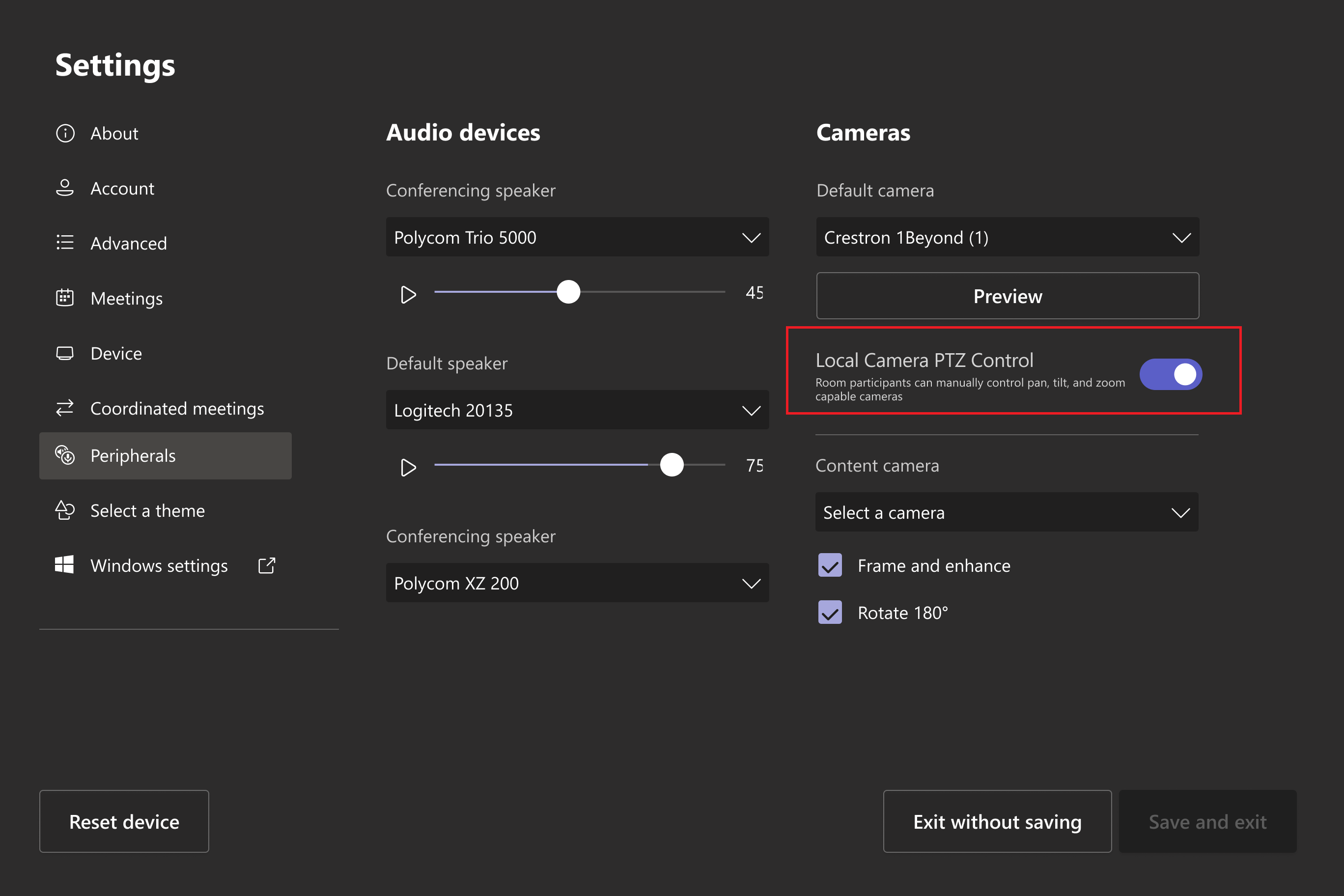
After this rollout: Admins will be able to toggle this feature for each Teams Rooms on Windows in the device's Admin Settings for Peripherals. This setting will be on by default.
Local PTZ controls in the Camera settings pop-up menu for supported cameras when Enhanced Framing is disabled:
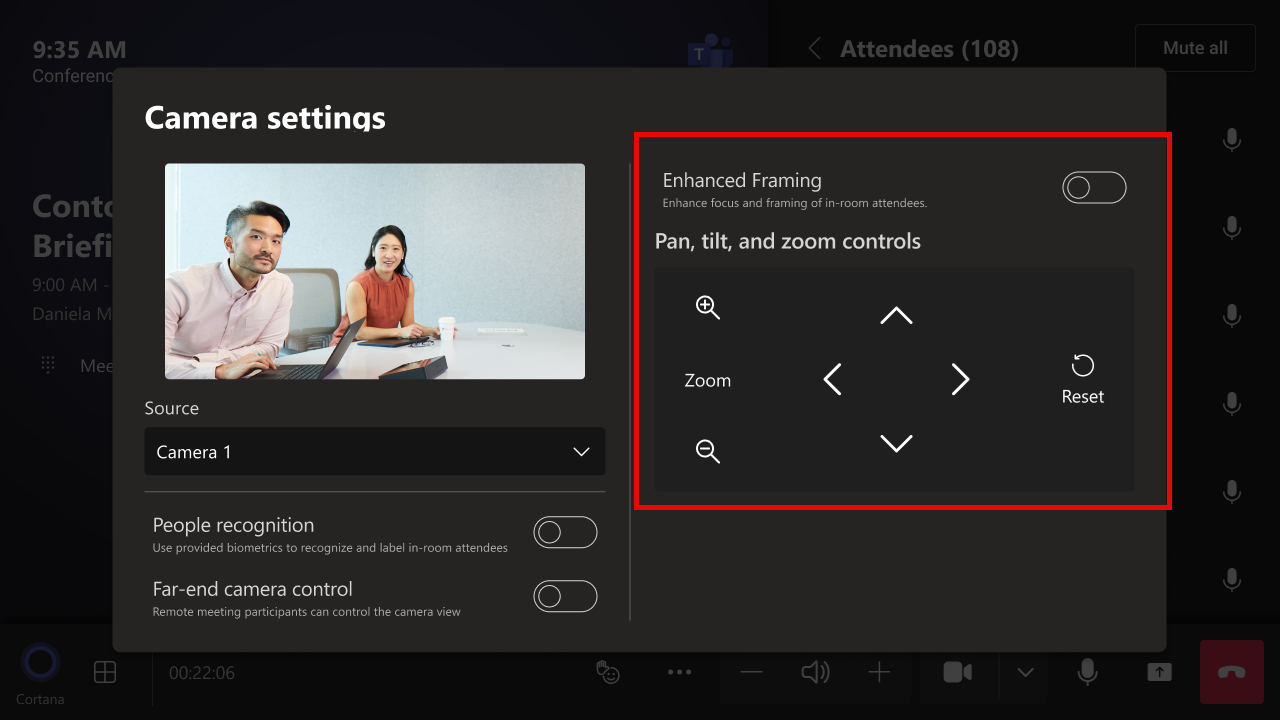
Users in a Teams Rooms on Windows with a PTZ-capable camera connected will see PTZ controls in the Camera settings pop-up menu.
Admin toggle for the local PTZ control in Settings > Peripherals:
[What you need to do to prepare:]
This rollout will happen automatically by the specified date with no admin action required before the rollout. You may want to notify your users about this new capability and update any supporting documentation for your users.
Before rollout, we will update this post with revised documentation.
Additional details from Microsoft
- RoadmapIds
- 409534
- Summary
- Microsoft Teams Rooms on Windows will support native PTZ camera controls in the Camera settings menu when Enhanced Framing is off. Rollout begins late September 2026 worldwide, with admin toggle enabled by default. No pre-rollout action is needed, but user notification and documentation updates are recommended.
- Platforms
- Desktop