
MC1443520 High
(Updated) Microsoft Teams: Specify who has control of production tools in meetings and webinars
Summary AI-generated
Teams adds a new meeting option letting organizers assign control of production tools to specific users during webinars and presenter-led meetings, improving event management.
Suggested actions AI-generated
- Inform users organizing webinars and presenter-led meetings
- Update internal training or documentation if needed
- Review event workflows for production staff assignment
Written by Azure OpenAI (gpt-4.1) from the text of the post below. It can be incomplete or wrong; the original post is authoritative.
Similar posts
Search for more like this- MC1443517 (Updated) Microsoft Teams: External presenters can manage event production controls
- MC1443518 (Updated) Microsoft Teams: Expanded presenter visibility in Manage what attendees see
- MC1419802 Microsoft Teams: New layout for sharing content in Teams events
- MC1188222 (Updated) Microsoft Teams: Private chat for organizers and presenters in structured meetings, webinars, and town halls
- MC688109 (Updated) Co-organizer experience updates in Teams Webinars and Townhalls
- MC1019312 Microsoft Teams: Meeting Participants Can Request Collaborative Annotation Sessions Dependent on Host Permission
Original post from Microsoft
Updated September 22, 2026: We have updated the timeline. Thank you for your patience.
[What and why]
Microsoft Teams is introducing a new meeting option for meetings with presenters and webinars that allows organizers to specify who has control of production tools during an event. This helps organizers assign production responsibilities to designated individuals, improving event management and reducing the risk of unintended changes during live events.
This message is associated with Microsoft 365 Roadmap ID 567305.
[Rollout schedule]
- Targeted Release: Beginning in mid-August 2026 and expect to complete by late August 2026
- General Availability (Worldwide, GCC, GCC High, DoD): Beginning in late August 2026 and expect to complete by end of October 2026 (previously mid-September)
[Impact on your organization]
Who is affected
- Organizers of meetings with presenters and webinars in Microsoft Teams
- Designated production staff who support live events
Platforms/Services
- Microsoft Teams
- Teams desktop app
- Teams web app
What will happen
- Organizers will see a new meeting option called Who has control of production tools:
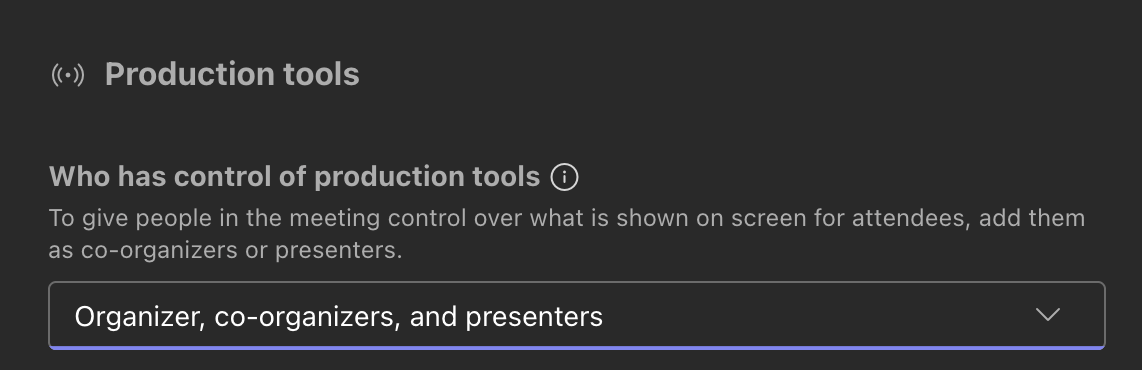
- This option will be enabled by default for eligible meetings with presenters and webinars.
- Organizers can designate specific users to manage production experiences during an event.
- Designated users will have access to controls in Manage what attendees see.
- Designated users will have access to Green Room controls.
- Event organizers can separate production responsibilities from presenter responsibilities when needed.
[Action required and recommendations]
No admin action is required. This capability will be available by default once rolled out.
We recommend that you:
- Inform users who organize webinars and presenter-led meetings about this new capability.
- Update internal training or event-production documentation, if applicable.
- Review planned live event workflows to determine whether dedicated production staff should be assigned using this new option.
Learn more
[Compliance considerations]
No compliance considerations identified. Review as appropriate for your organization.
Additional details from Microsoft
- RoadmapIds
- 567305
- FeatureStatusJson
- {"0":[{"RoadmapId":0,"McPostId":"MC1443520","Platform":"Desktop","Status":"FeatureRolloutStatusNotSupported","LastUpdateTime":"2026-09-23T03:00:27.3776857Z","LatestRing":null,"TenantRolloutRing":null},{"RoadmapId":0,"McPostId":"MC1443520","Platform":"Mac","Status":"FeatureRolloutStatusNotSupported","LastUpdateTime":"2026-09-23T03:00:27.3776859Z","LatestRing":null,"TenantRolloutRing":null},{"RoadmapId":0,"McPostId":"MC1443520","Platform":"All","Status":"FeatureRolloutStatusNotSupported","LastUpdateTime":"2026-09-23T03:00:27.3776859Z","LatestRing":null,"TenantRolloutRing":null}]}
- Summary
- Microsoft Teams will introduce a default meeting option allowing organizers to specify who controls production tools in meetings and webinars, improving event management by assigning production roles separately from presenters. Rollout starts mid-August 2026, completing by October 2026, with no admin action required.
- Platforms
- Desktop, Mac, Web