
MC1311978 High
(Updated) Classic Outlook for Windows: User-initiated insights with Copilot
Summary AI-generated
User Initiated Insights in Copilot for classic Outlook lets users highlight email text and prompt Copilot for contextual insights, enhancing user control and productivity.
Suggested actions AI-generated
- Remove or restrict Copilot capabilities if you do not want users to access this feature
- Verify users are running the latest version of classic Outlook for Windows
- Inform helpdesk and support staff about this new Copilot interaction model
- Communicate to users how to select text and invoke Copilot for contextual insights
Written by Azure OpenAI (gpt-4.1) from the text of the post below. It can be incomplete or wrong; the original post is authoritative.
Similar posts
Search for more like this- MC1176366 (Updated) Microsoft Outlook: Enhanced search experience with Copilot in Classic Outlook
- MC1430542 (Updated) Microsoft Outlook: Collaborate with Copilot while drafting email
- MC1173196 (Updated) Microsoft 365 Copilot: Edit in Outlook from Copilot Chat
- MC1293485 Microsoft 365 Copilot: Use Copilot in Outlook to manage your inbox - available in Frontier Public
- MC1470885 M365 Copilot: Tell Copilot what you need directly from the Copilot button in Word, Excel, and PowerPoint
- MC1228331 Microsoft 365 Copilot: Prepare for meetings with Copilot in classic Outlook for Windows
Original post from Microsoft
Updated September 1, 2026: We have updated the timeline. Thank you for your patience.
[Introduction]
We're introducing User Initiated Insights in Copilot for classic Outlook for Windows, enabling users to manually select text within an email and prompt Copilot to provide contextual insights. This enhancement gives users greater control over when and how Copilot assists them, improving productivity, clarity, and decision-making directly within their workflow.
This message is associated with Roadmap ID 508524.
[When this will happen:]
- Public Preview (Worldwide): We began rolling out in early May 2026 and expect to complete by late May 2026.
- General Availability (Worldwide): We will begin rolling out in early October 2026 (previously early September) and expect to complete by end of October 2026 (previously end of September).
[How this affects your organization:]
Who is affected:
- Users with Microsoft 365 Copilot capabilities
- Organizations using classic Outlook for Windows
What will happen:
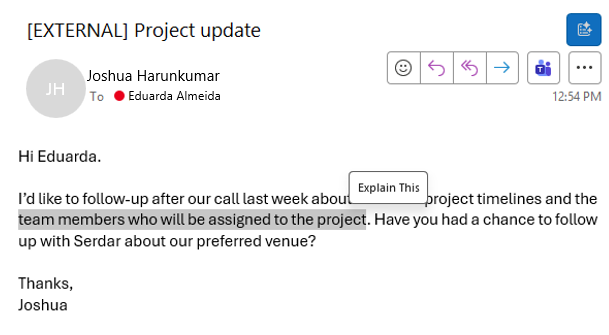
- Users will be able to highlight text in emails and invoke Copilot to generate insights.
- Functionality is built into the Outlook experience and does not require a separate add-in.
- The feature will be on by default for eligible users.
- Existing Microsoft 365 security, compliance, and data protection policies continue to apply.
Screenshot: When text is highlighted in an email, an Explain This button appears to provide additional context:
[What you can do to prepare:]
- If you do not want users to access this feature, remove or restrict Copilot capabilities.
- Verify users are running the latest version of classic Outlook for Windows.
- Inform helpdesk and support staff about this new Copilot interaction model.
- Communicate to users how to select text and invoke Copilot for contextual insights.
Learn more:
- How do I enable or disable Microsoft Copilot on MS 365 Premium | Microsoft Learn
- Instructions to turn off Copilot | Microsoft Support
[Compliance considerations:]
| Compliance area | Explanation |
| Introduces AI/ML capabilities interacting with customer data. | The feature enables Copilot to process user-selected email content to generate insights. |
| Provides a new way for users to interact with generative AI. | Users can invoke Copilot directly by selecting text within emails. |
| Allows users to enable or disable the feature at use time. | Users control invocation by choosing when to select text and engage Copilot. |
Additional details from Microsoft
- RoadmapIds
- 508524
- Summary
- User-initiated insights with Copilot in classic Outlook for Windows allow users to highlight email text and prompt Copilot for contextual insights. Rolling out worldwide: Public Preview in May 2026, General Availability in October 2026. Feature is on by default for eligible users and integrates seamlessly without add-ins.
- Platforms
- Desktop