
← Back
Microsoft Purview | Data Lifecycle Management: Retention based on “last accessed” for OneDrive and SharePoint files
MC999442 · build prod-20251231-200323
Category
planForChange
Severity
normal
Major change
False
Last modified
2026-02-04 18:07:05
Summary source
Azure OpenAI (gpt-4.1)
Action by (Graph)
Action by (AI)
2026-05-25 00:00:00
Services
Microsoft Purview
Tags
Updated message, New feature, Admin impact
Master tags
User, Admin, Copilot License
Roadmap IDs
472030

One-line summary

Admins can soon apply retention policies/labels in OneDrive and SharePoint based on files' last accessed date to help manage obsolete data and improve Copilot response quality.

Similar updates

More like this
MC1115304 (Updated) Introduction of secure workflow to bypass retention/legal holds on OneDrive and SharePoint
(Updated) Introduction of secure workflow to bypass retention/legal holds on OneDrive and SharePoint Admins can now bypass retention policies to delete OneDrive and SharePoint content early using new Purview Priority Cleanup policies, with enhanced... What and Why: We're introducing a new capability in Microsoft Purview Data Lifecycle Management.
MC1183292 Microsoft Purview | Data Lifecycle Management - Introducing secure priority cleanup workflows for OneDrive/SharePoint
Microsoft Purview | Data Lifecycle Management - Introducing secure priority cleanup workflows for OneDrive/SharePoint Admins can now override retention policies to delete OneDrive and SharePoint content early, supporting Copilot artifacts; requires new Purview roles and explicit policy setup. ...icrosoft Purview Data Lifecycle Management that.
MC791110 (Updated) Microsoft Purview | Data Lifecycle Management: New integration with Adaptive protection
(Updated) Microsoft Purview | Data Lifecycle Management: New integration with Adaptive protection Microsoft Purview integrates Adaptive protection with Data Lifecycle Management to auto-retain deleted items by elevated risk users; rollout starts June 2026. ... Coming soon for Microsoft Purview: We are announcing the public preview of the.
MC1137593 (Updated) Restrict new file creation in Office desktop apps to Cloud Locations
This policy is available now in the Administrative Template files for Microsoft Office (version 5516.1000 or newer). ...rs to OneDriveFiles saved in the Cloud are automatically subject to Microsoft Purview compliance controls, including Information Protection labels, Data Loss Prevention (DLP), and retention policies. Files saved in the Cloud.
MC1164381 (Updated) OneDrive: Simplified file transfer for departing employees
(Updated) OneDrive: Simplified file transfer for departing employees OneDrive now streamlines file transfers and notifications for departing employees, improving visibility, filtering, bulk moves, and retention alerts to aid in content handover. Introduction We’re introducing enhancements to OneDrive that simplify the process of managing files.
MC929014 (Updated) Microsoft Loop – Departed User Content Workflows for User-Owned Loop workspaces
(Updated) Microsoft Loop – Departed User Content Workflows for User-Owned Loop workspaces Admins can manage retention and deletion workflows for user-owned Loop workspaces, including Copilot Pages, when users leave; rollout begins mid-April 2026. Manage retention and deletion workflows for user-owned Loop workspaces such as Copilot Pages and the.

Details

RoadmapIds
472030
Summary
Microsoft Purview will soon allow admins to apply retention policies based on files' last accessed date in OneDrive and SharePoint, starting preview in late May 2026 and general availability in late June 2026. This helps delete obsolete data and improves Microsoft 365 Copilot responses. No admin action required before rollout.
Platforms
Web

Body (from Message Center)

Updated February 4, 2026: We have updated the timeline. Thank you for your patience.

Coming soon for Microsoft Purview | Data Lifecycle Management: Admins will be able to apply a retention policy or retention label in Microsoft OneDrive and Microsoft SharePoint for files that have not been accessed by anyone in your organization for a specified period of time. This message applies to retention for Microsoft 365 file types. We will support other file types (non-Microsoft 365) in a future rollout.

This message is associated with Microsoft 365 Roadmap ID 472030.

[When this will happen:]

Preview: We will begin rolling out late May 2026 (previously late January) and expect to complete by mid-June 2026 (previously late June)

General Availability (Worldwide): We will begin rolling out late June 2026 (previously mid-January 2026) and expect to complete by mid-July 2026 (previously late July)

[How this will affect your organization:]

This feature will help delete obsolete data, which will improve the quality and relevance of Microsoft 365 Copilot responses.

This feature will be available by default.

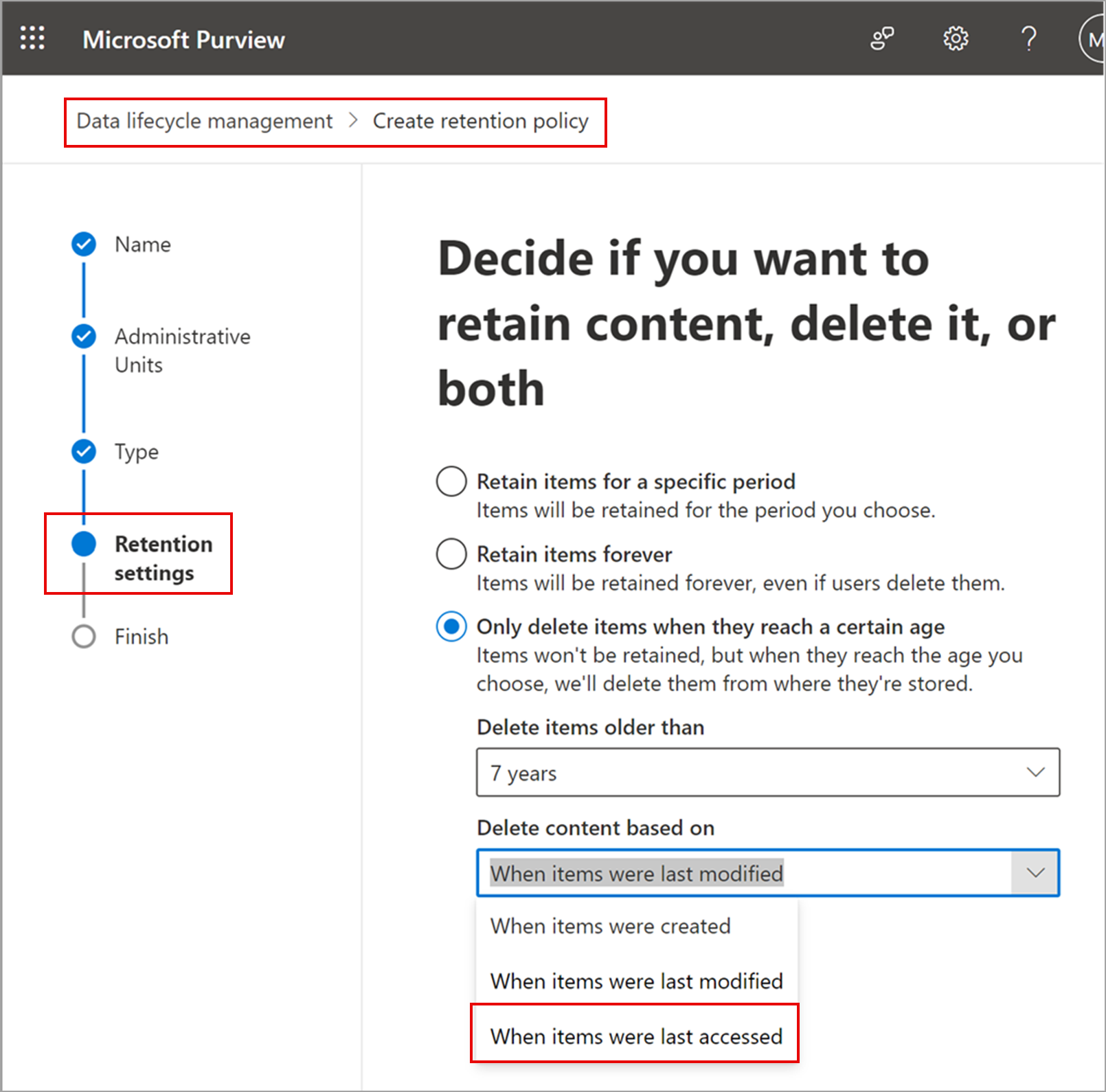
After the rollout, admins can use the retention control When items were last accessed when configuring labels and policies.

Retention settings page in Purview with the new “last accessed” option for retention policies:
admin controls

[What you need to do to prepare:]

This rollout will happen automatically by the specified date with no admin action required before the rollout. Review your current configuration to determine the impact for your organization. You may want to notify your users about this change and update any relevant documentation.

Before rollout, we will update this post with new documentation.

Raw JSON (for debugging)

Expand/collapse the full payload below.
Show/hide raw
{
  "snapshot_item": {
    "action_required_by": null,
    "ai_action_required_by": "2026-05-25T00:00:00Z",
    "ai_actions": [
      "Review retention settings",
      "Notify users",
      "Update documentation"
    ],
    "ai_master_tags": [
      "User",
      "Admin",
      "Copilot License"
    ],
    "ai_model": "gpt-4.1",
    "ai_summary": "Admins can soon apply retention policies/labels in OneDrive and SharePoint based on files\u0027 last accessed date to help manage obsolete data and improve Copilot response quality.",
    "ai_topics": [
      "Purview",
      "OneDrive",
      "SharePoint",
      "Copilot"
    ],
    "category": "planForChange",
    "details_map": {
      "Platforms": "Web",
      "RoadmapIds": "472030",
      "Summary": "Microsoft Purview will soon allow admins to apply retention policies based on files\u0027 last accessed date in OneDrive and SharePoint, starting preview in late May 2026 and general availability in late June 2026. This helps delete obsolete data and improves Microsoft 365 Copilot responses. No admin action required before rollout."
    },
    "id": "MC999442",
    "importance": 4,
    "is_major_change": false,
    "last_modified": "2026-02-04T18:07:05Z",
    "ms_products": [
      "Purview"
    ],
    "platforms": "Web",
    "roadmap_ids": [
      "472030"
    ],
    "services": [
      "Microsoft Purview"
    ],
    "severity": "normal",
    "tags": [
      "Updated message",
      "New feature",
      "Admin impact"
    ],
    "title": "Microsoft Purview | Data Lifecycle Management: Retention based on \u201clast accessed\u201d for OneDrive and SharePoint files"
  }
}