
MC1562278 Medium
Microsoft Teams: Expanded Markdown support in the compose box
Summary AI-generated
Microsoft Teams introduces an updated Markdown compose experience with expanded formatting, toolbar, message preview, and mode switching.
Written by Azure OpenAI (gpt-4.1) from the text of the post below. It can be incomplete or wrong; the original post is authoritative.
Similar posts
Search for more like this-
MC1240703 (Updated) Microsoft Teams: Code block line numbers and improved keyboard accessibility
(Updated) Microsoft Teams: Code block line numbers and improved keyboard accessibility Microsoft Teams code blocks are enhanced with default line numbers, better keyboard navigation, and improved syntax highlighting, rolling out to all users in May 2026. [Introduction] We’re introducing improvements to the code block experience in Microsoft.
-
MC1261592 View and edit Markdown files in OneDrive and SharePoint
View and edit Markdown files in OneDrive and SharePoint OneDrive and SharePoint users can soon view and edit Markdown files directly in-browser with a new editor, toolbar, live preview, and rich formatting; rollout starts mid-April 2026. [Introduction] OneDrive and SharePoint now support viewing and editing Markdown (.md) files directly in the.
-
MC1217643 (Updated) Microsoft Teams: Choose your "Enter" key behavior in Teams Chat Settings
(Updated) Microsoft Teams: Choose your "Enter" key behavior in Teams Chat Settings Teams Desktop/Web gains a per-user setting for Enter key behavior in message compose, letting users choose between sending or inserting a new line. Updated February 3, 2026: We have updated the timeline. [Introduction] We’re adding a new setting in Microsoft Teams.
-
MC1423103 (Updated) Copilot Notebooks now supports Markdown (.md) files as grounding sources
(Updated) Copilot Notebooks now supports ... Updated July 20, 2026: We have updated the timeline. Thank you for your patience. [What and Why:] Microsoft is expanding Copilot Notebooks to support Markdown (.md) files as notebook reference sources. This enhancement enables users to ground Copilot conversations in technical documentation, README.
-
MC1250273 (Updated) Improved copy and paste support for @mentions and shared contacts in Microsoft Teams
(Updated) Improved copy and paste support for @mentions and shared contacts in Microsoft Teams Teams now preserves @mentions, shared contacts, and supported @tags when users copy and paste messages, keeping them interactive where possible across... [Introduction] Microsoft Teams is improving the copy and paste experience for messages that.
-
MC1223820 Microsoft Teams: View code blocks on mobile
Microsoft Teams: View code blocks on mobile Teams mobile apps will soon display code blocks with syntax highlighting and line numbers for easier reading; rollout starts early February 2026 and requires no admin action. [Introduction] We’re introducing improved support for viewing code blocks in the Microsoft Teams mobile app for iOS and.
Original post from Microsoft
[What and why]
Microsoft Teams is introducing an updated Markdown compose experience with expanded formatting support. Users can write and edit with Markdown syntax intact, without formatting automatically rendering as they type. A dedicated Markdown toolbar helps users insert formatting syntax, preview the rendered message before sending, and switch between Markdown and rich text.
[Rollout schedule]
- General Availability (Worldwide, GCC, GCC High, DoD): Beginning in early December 2026 and expected to complete by mid-December 2026
[Impact on your organization]
Who is affected
- Microsoft Teams users who compose messages in chats and channels on supported platforms
Platforms and services
- Microsoft Teams for Windows, Mac, and web
What will happen
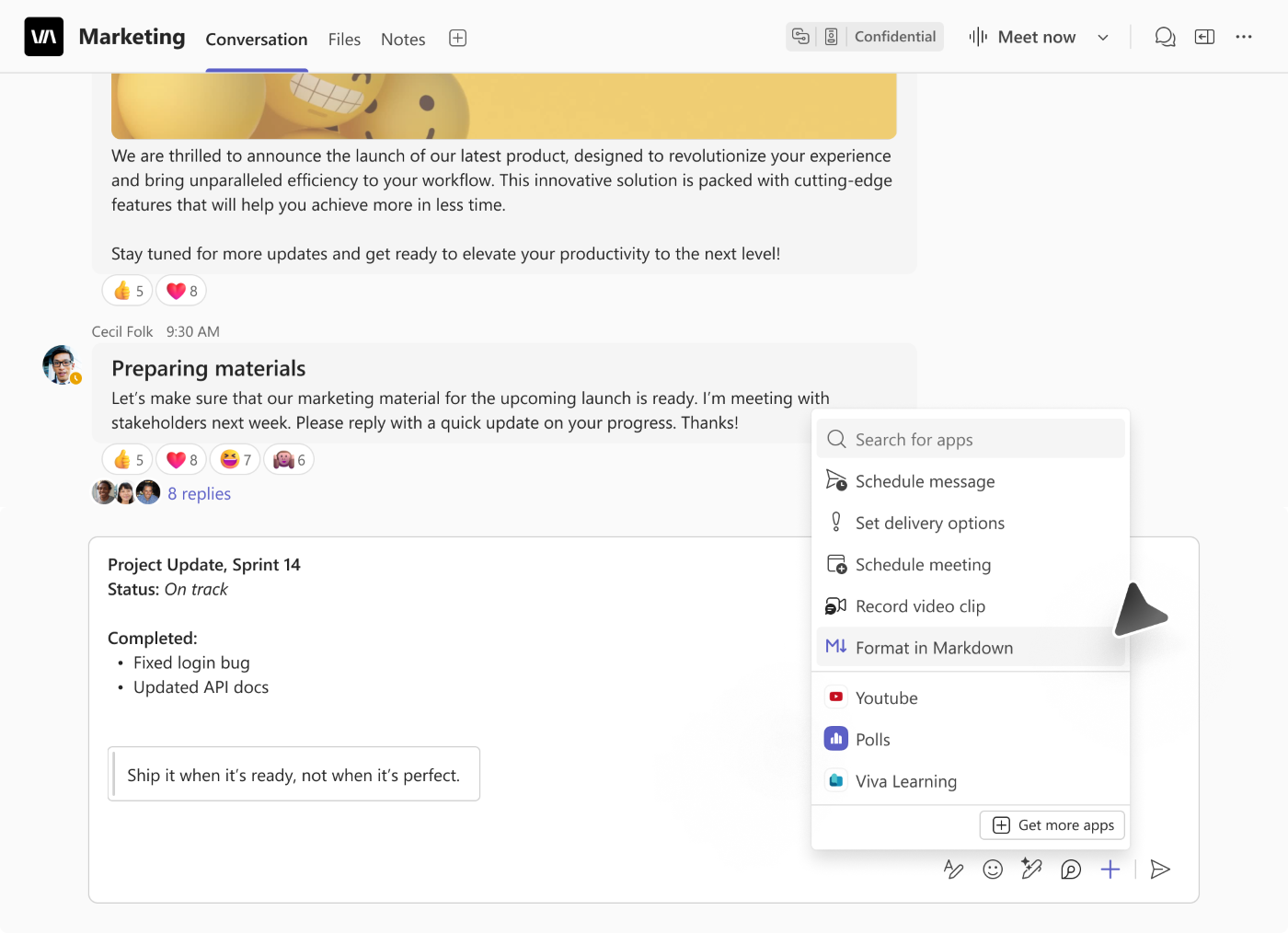
Users will be able to select Format in Markdown from the compose box’s Actions and apps (+) menu (Screenshot 1).
The updated experience includes:
- Markdown authoring without live rendering: Syntax remains visible and editable while users write.
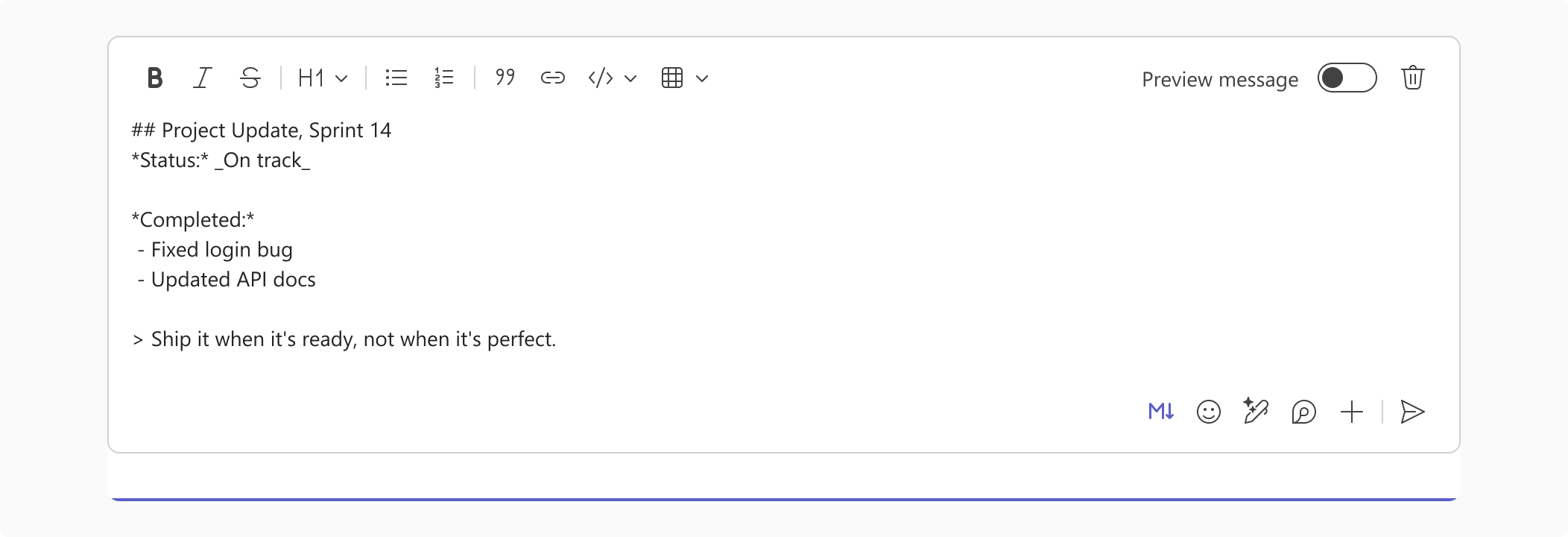
- A dedicated Markdown toolbar: Users can insert syntax for formatting (Screenshot 2).
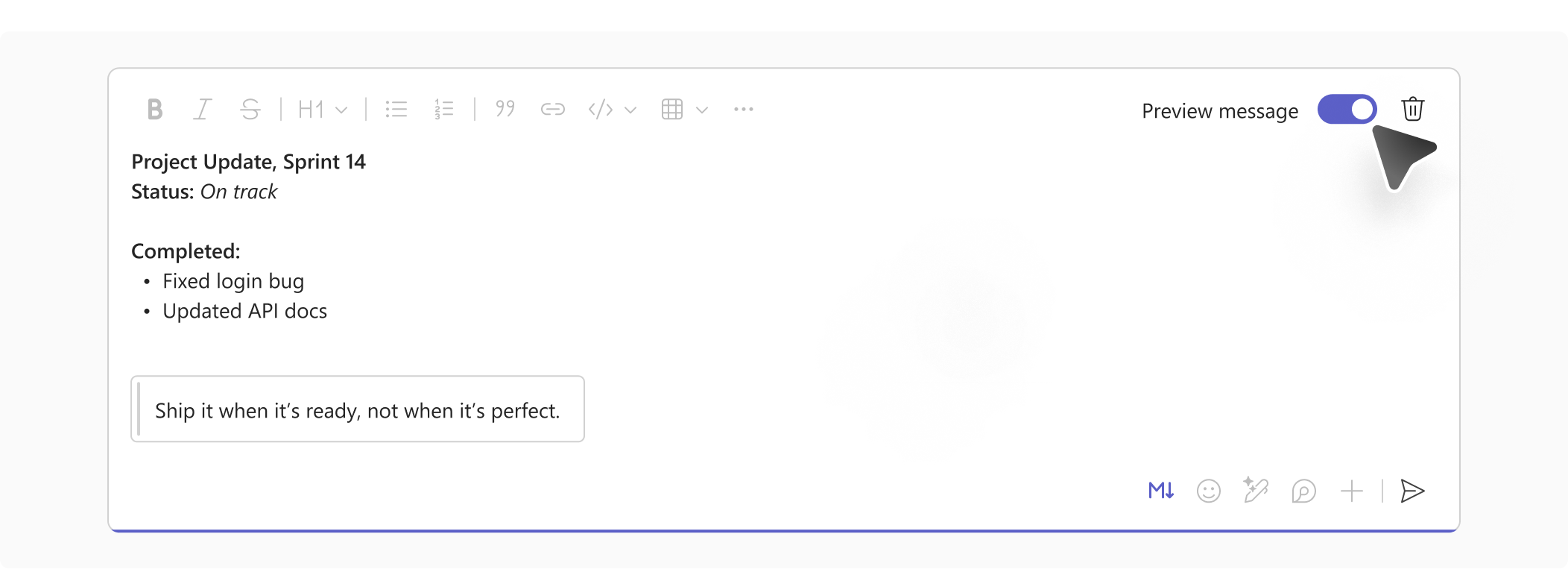
- Message preview: Users can turn on Preview message to see the rendered formatting before sending (Screenshot 3).
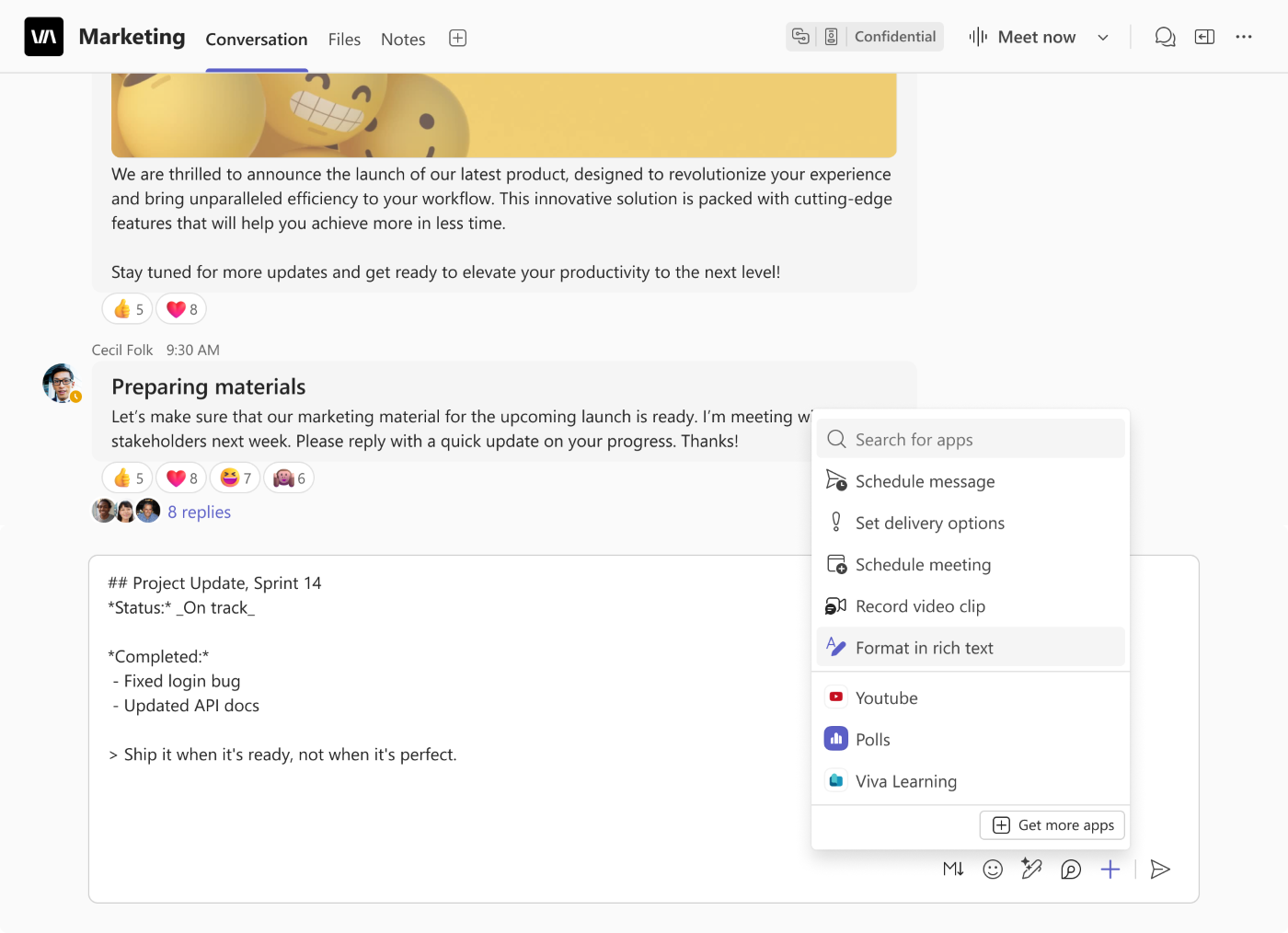
- Switching between compose modes: Users can select Format in rich text from the same menu to return to rich text authoring (Screenshot 4).
Teams will remember the user’s selected compose mode and apply it across chats and channels until the user switches modes.
Learn more
[Action required and recommendations]
No admin action is required to prepare for this feature.
[Compliance considerations]
No compliance considerations identified. Review as appropriate for your organization.
Additional details from Microsoft
- RoadmapIds
- 576199
- FeatureStatusJson
- {"0":[{"RoadmapId":0,"McPostId":"MC1562278","Platform":"Desktop","Status":"FeatureRolloutStatusNotSupported","LastUpdateTime":"2026-11-21T03:00:44.7864068Z","LatestRing":null,"TenantRolloutRing":null},{"RoadmapId":0,"McPostId":"MC1562278","Platform":"Linux","Status":"FeatureRolloutStatusNotSupported","LastUpdateTime":"2026-11-21T03:00:44.7864068Z","LatestRing":null,"TenantRolloutRing":null},{"RoadmapId":0,"McPostId":"MC1562278","Platform":"Mac","Status":"FeatureRolloutStatusNotSupported","LastUpdateTime":"2026-11-21T03:00:44.7864069Z","LatestRing":null,"TenantRolloutRing":null},{"RoadmapId":0,"McPostId":"MC1562278","Platform":"All","Status":"FeatureRolloutStatusNotSupported","LastUpdateTime":"2026-11-21T03:00:44.7864069Z","LatestRing":null,"TenantRolloutRing":null}]}
- Summary
- Microsoft Teams will launch an expanded Markdown compose experience in early December 2026, allowing users to write with visible Markdown syntax, use a dedicated toolbar, preview messages before sending, and switch between Markdown and rich text. No admin action is needed.
- Platforms
- Desktop, Mac, Web