
MC1558041 High
Microsoft OneDrive for iPad: Presentation mode for PDFs
Summary AI-generated
OneDrive for iPad adds presentation mode in PDF viewer, offering focused, view-only display without free scrolling; feature is enabled by default for all users.
Suggested actions AI-generated
- Inform helpdesk/support teams
- Update internal user guidance for PDFs in iPad OneDrive
Written by Azure OpenAI (gpt-4.1) from the text of the post below. It can be incomplete or wrong; the original post is authoritative.
Similar posts
Search for more like this-
MC1268909 Improved secure file preview experience in OneDrive for iOS and iPadOS
Improved secure file preview experience in OneDrive for iOS and iPadOS OneDrive iOS/iPadOS app adds secure file preview for Word, Excel, and PowerPoint, enforcing existing security and compliance policies without file downloads. ...n:] Who is affected: All users who access OneDrive files using the OneDrive mobile app on iOS and iPadOS What.
-
MC1423117 Thumbnail view for PDFs is available in OneDrive and SharePoint on the web
Thumbnail view for PDFs is available in OneDrive and SharePoint on the web PDF viewer in OneDrive and SharePoint Online gains a thumbnail panel for improved navigation, allowing users to visually browse and jump to specific pages. Recommended actions: Inform helpdesk and support teams about this user experience improvement Update internal.
-
MC1423115 PDF annotation for sensitivity-label protected PDFs in the OneDrive apps (iOS and Android)
PDF annotation for sensitivity-label protected PDFs in the OneDrive apps (iOS and Android) OneDrive iOS/Android apps will support annotating sensitivity-label protected PDFs directly, maintaining encryption and labels, enhancing secure mobile productivity. ...PDFsLearn more: Features available for PDFs in OneDrive in Web and mobiles/iPads -.
-
MC1470417 (Updated) Microsoft 365 Copilot: Review PDFs using the Copilot context menu on OneDrive iOS
(Updated) Microsoft 365 Copilot: Review PDFs using the Copilot context menu on OneDrive iOS Microsoft 365 Copilot makes PDF reviews faster/easier on OneDrive iOS, but rollout is canceled and will not proceed at this time. Updated October 20, 2026: We have decided not to move forward with this change at this time. [What and why:] Microsoft 365.
-
MC1393813 OneDrive: Find and browse document libraries on mobile
OneDrive: Find and browse document libraries on mobile The OneDrive iOS mobile app is being updated to make it easier for users to find and access SharePoint document libraries, aligning the mobile experience with desktop and web. [Introduction] We’re improving the OneDrive iOS mobile experience to make it easier for users to find and access .
-
MC1458481 (Updated) Improved OneDrive experience in Apple Files app
(Updated) Improved OneDrive experience in Apple Files app OneDrive integration with Apple Files app on iOS is being updated to show only editable shared content; read-only libraries will not appear after rollout. Updated August 28, 2026: We have updated the timeline. [What and Why:] We're improving the OneDrive integration with the Apple Files.
Original post from Microsoft
[What and why]
We are introducing presentation mode in the Microsoft OneDrive app for iPad. Users can select a new Presentation button in the PDF viewer to enter a focused, view-only experience that prevents free gesture scrolling between pages, reducing accidental page changes while presenting without requiring users to move the file to another app. This update is based on customer feedback requesting a presentation experience directly in the OneDrive PDF viewer. This feature is not available on iPhone.
[Rollout schedule]
- General Availability (Worldwide): Rollout will begin in early December 2026 and is expected to complete by late December 2026.
[Impact on your organization]
Who is affected
- Users who open and present PDF files in the OneDrive app for iPad.
Platforms and services
- Microsoft OneDrive for iPad
What will happen
- Users can select the Presentation button in the OneDrive PDF viewer to enter presentation mode.
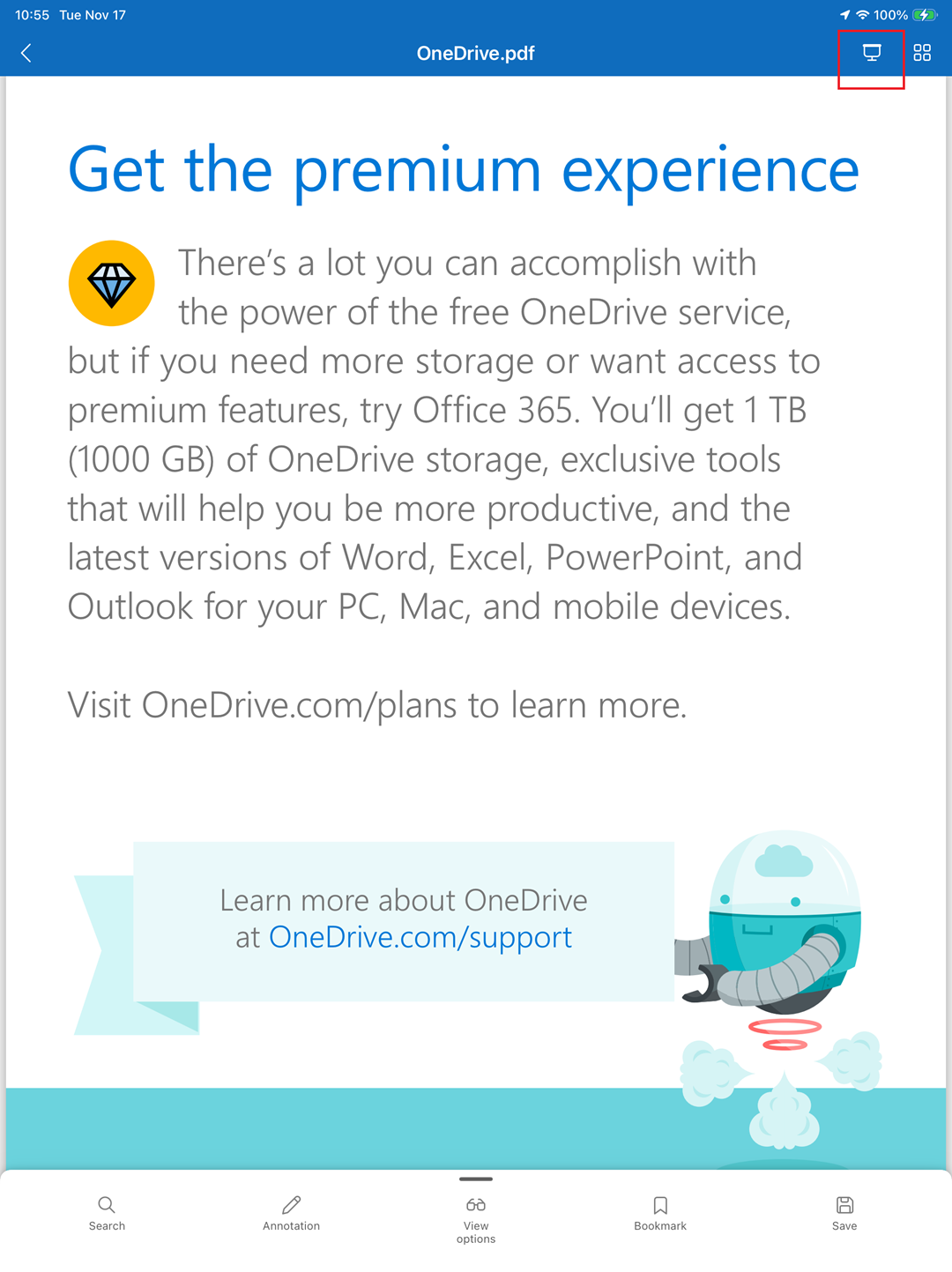
- Presentation mode supports all PDFs, displays them in a view-only experience without editing controls, and does not intentionally change them or create a new copy.
- Free scrolling or swiping between pages is disabled in presentation mode, preventing accidental page changes. Users can switch pages only by selecting the on-screen navigation buttons.
- The feature is enabled by default for all OneDrive for Business customers.
- No admin control or tenant configuration is available for this feature.
- Presentation mode changes how a PDF is displayed during a presentation and does not intentionally change file storage, permissions, sharing, retention, or audit behavior. Existing OneDrive access permissions and protections applied to the PDF continue to apply.
[Action required and recommendations]
No administrative action is required before rollout. We recommend that you inform helpdesk and support teams about the new presentation experience and update internal user guidance for presenting PDFs from the OneDrive app for iPad.
[Compliance considerations]
No compliance considerations identified. Review as appropriate for your organization.
Additional details from Microsoft
- RoadmapIds
- 573697
- Summary
- Microsoft OneDrive for iPad will introduce a presentation mode for PDFs, enabling a focused, view-only experience that disables free scrolling to prevent accidental page changes. Rolling out worldwide in December 2026, it is enabled by default with no admin controls required and does not affect file permissions or compliance.
- Platforms
- iOS