
MC1539000 High
Microsoft Outlook: Search within a selected folder
Summary AI-generated
Users can now select a mail folder and scope Outlook search results to that folder, providing more control over searches.
Written by Azure OpenAI (gpt-4.1) from the text of the post below. It can be incomplete or wrong; the original post is authoritative.
Similar posts
Search for more like this-
MC1193413 Microsoft 365 Copilot: Data source-specific filters in search
Microsoft 365 Copilot: Data source-specific filters in search Microsoft 365 Copilot search adds dynamic, data source-specific filters to refine results; feature enabled by default for all users, no admin action required. We are introducing a dynamic f... When a user selects a data source—such as Outlook, SharePoint, Teams, Azure DevOps (ADO),.
-
MC1238433 Updates to filtered message viewing in Outlook for iOS and Android
Updates to filtered message viewing in Outlook for iOS and Android Outlook for iOS/Android will prompt users to search server-wide when filtered message lists may have more items than synced locally, aiding message discovery. [Introduction] We’re updating Outlook for iOS and Android to make it clearer when additional messages may be available.
-
MC1509800 Microsoft Outlook for Android: Multi-select and bulk actions in search results
Microsoft Outlook for Android: Multi-select and bulk actions in search results Outlook for Android adds multi-select and bulk actions in search results, letting users quickly organize, move, archive, delete, or report multiple emails at once. [What and why] We’re introducing multi-select and bulk mail actions in Outlook search results on Android..
-
MC1519843 (Updated) New Outlook for Windows: All Accounts view brings email into a single inbox view
(Updated) New Outlook for Windows: All Accounts view brings email into a single inbox view Unified Inbox (All Accounts view) lets users see email from multiple connected accounts together in Outlook for Windows, with admin controls now available for configuring this experience. The policy “Show All Accounts view for users with multiple accounts.
-
MC1458484 Filter Messages by Events on Outlook Mobile
Filter Messages by Events on Outlook Mobile Outlook is introducing a new Events message filter to help users quickly find calendar invitations and event-related messages in their mailbox. [What and why:] We're introducing a new Events message filter in Outlook that helps users quickly find calendar invitations and event-related messages in.
-
MC1183297 (Updated) New toolbar customization for multi-select in Outlook Mobile
(Updated) New toolbar customization for multi-select in Outlook Mobile Outlook Mobile's multi-select toolbar will soon let users customize action order and placement when selecting multiple emails, with new bulk actions like Move to Other, Report Junk, Ignore, Pin, and Snooze. Updated December 16, 2025: We have updated the timeline..
Original post from Microsoft
[What and why]
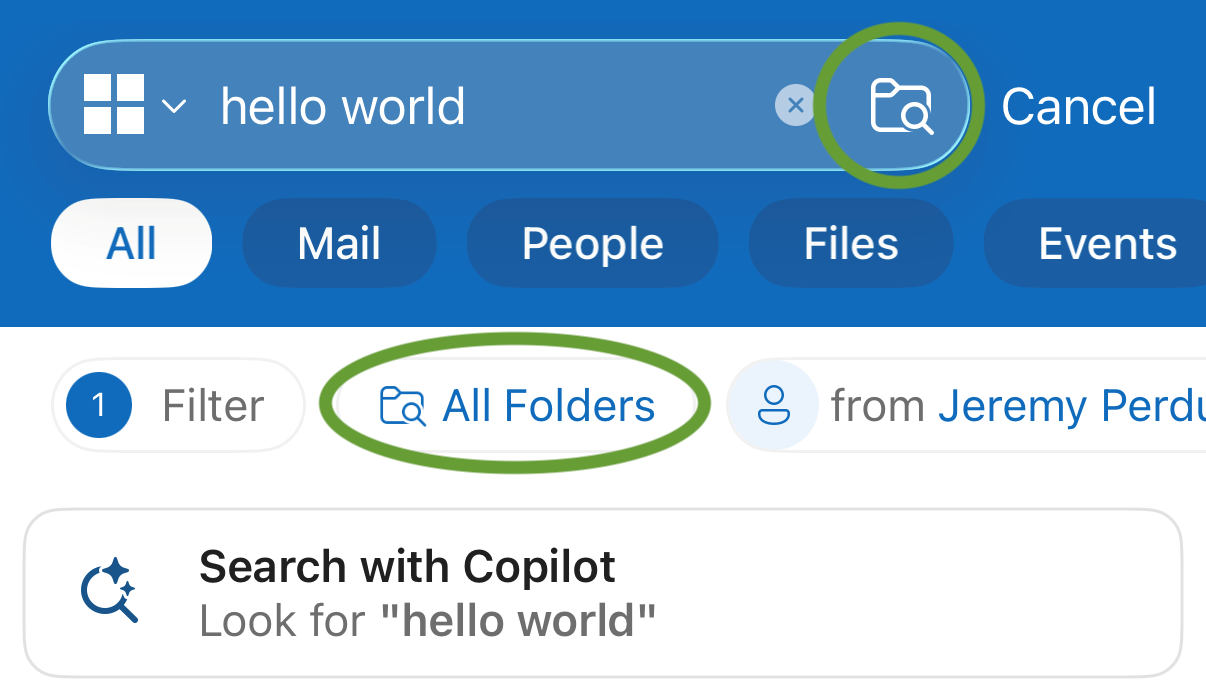
Users can now select a mail folder and scope Outlook search results to that folder. This update gives users more control over their searches by helping them narrow results to a specific folder.
[Rollout schedule]
General Availability (Worldwide, GCC, GCC High, DoD): We will begin rolling out in mid-November 2026 and expect to complete in mid-November 2026.
[Impact on your organization]
Who is affected
- Users who use Outlook search
Platforms and services
- Outlook
What will happen
- Users will have folder selection options in Outlook search.
- Users can select a mail folder and scope search results to that folder.
[Action required and recommendations]
No action is required.
[Compliance considerations]
No compliance considerations identified. Review as appropriate for your organization.
Additional details from Microsoft
- Summary
- Outlook will allow users to limit search results to a selected mail folder, enhancing search control. This feature will roll out globally in mid-November 2026. No action or compliance concerns are required.