
MC1530615 High
(Updated) Microsoft Teams: Report guest invitations for security concerns
Summary AI-generated
Teams users can report guest invitations for security concerns directly to IT admins, helping mitigate phishing and abuse through guest invitations.
Suggested actions AI-generated
- Review Teams messaging policies to ensure 'Report a security concern' is enabled
Written by Azure OpenAI (gpt-4.1) from the text of the post below. It can be incomplete or wrong; the original post is authoritative.
Similar posts
Search for more like this- MC1466296 Microsoft Teams: Report security concerns in meetings
- MC1446794 Microsoft Teams: Report security concerns in Teams meetings
- MC1447673 Microsoft Teams: Users can report security concerns in group calls
- MC1309744 (Updated) Microsoft Teams: Report external users for security concerns
- MC1311977 (Updated) Security Detection Report in Teams Admin Center
- MC1219788 (Updated) Microsoft Defender for Office 365: Enable users to report suspicious Teams messages in Plan 1
Original post from Microsoft
Updated November 17, 2026: We have updated the timeline. Thank you for your patience.
[What and Why:]
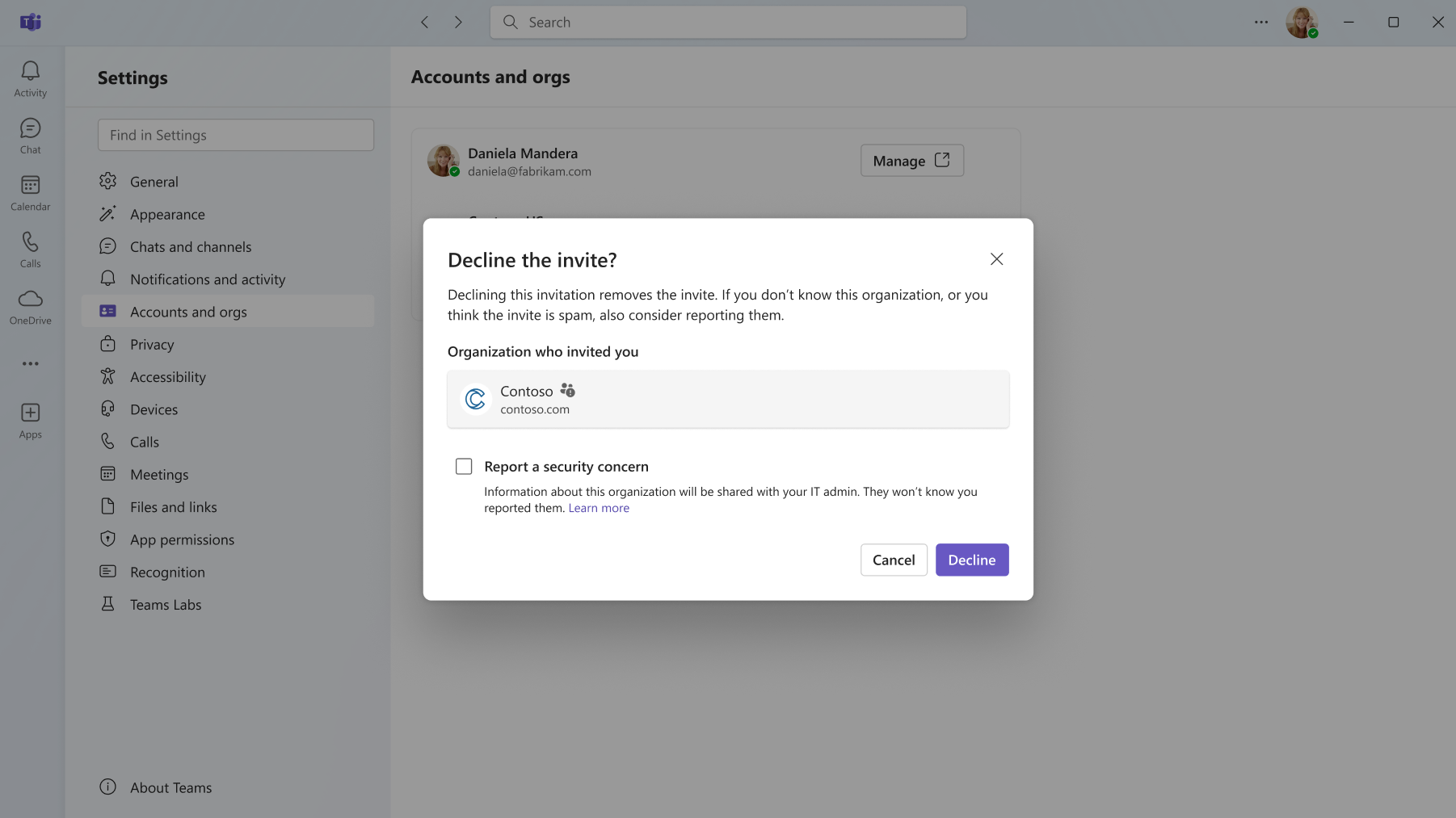
Microsoft Teams will enable users to report guest invitations for security concerns directly from Teams. When users receive an unexpected or potentially malicious invitation to join another organization as a guest, they can report it to their IT admin for review, helping identify and mitigate phishing and other abuse through guest invitations.
[Rollout Schedule:]
General Availability (Worldwide): We will begin rolling out in late November 2026 (previously mid-November) and expect to complete by late November 2026 (previously mid-November).
[Impact on Your Organization:]
Users can report suspicious guest invitations when declining them in Teams. Reports are shared with their IT admin through the User reported security submissions report in the Teams admin center and with Microsoft for review.
[Action Required/Recommendations:]
No action is required for organizations that already have Report a security concern enabled in their Teams messaging policy. Admins can manage this capability through Teams admin center > Messaging policies > Report a security concern.
[Compliance considerations:]
| Question | Answer |
| Does the change include an admin control? | Yes. The capability is controlled through the Teams messaging policy setting for Report a security concern. |
Additional details from Microsoft
- RoadmapIds
- 571297
- FeatureStatusJson
- {"0":[{"RoadmapId":0,"McPostId":"MC1530615","Platform":"Desktop","Status":"FeatureRolloutStatusNotSupported","LastUpdateTime":"2026-11-18T03:00:38.9167733Z","LatestRing":null,"TenantRolloutRing":null},{"RoadmapId":0,"McPostId":"MC1530615","Platform":"Mac","Status":"FeatureRolloutStatusNotSupported","LastUpdateTime":"2026-11-18T03:00:38.9167734Z","LatestRing":null,"TenantRolloutRing":null},{"RoadmapId":0,"McPostId":"MC1530615","Platform":"All","Status":"FeatureRolloutStatusNotSupported","LastUpdateTime":"2026-11-18T03:00:38.9167735Z","LatestRing":null,"TenantRolloutRing":null}]}
- Summary
- Microsoft Teams will let users report suspicious guest invitations for security concerns starting late November 2026. Reports go to IT admins via the Teams admin center. No action is needed if "Report a security concern" is already enabled in messaging policies, which control this feature.