
MC1422054 High
Microsoft Planner: Task details side pane experience
Summary AI-generated
A new side pane in Microsoft Planner allows users to edit task details without leaving their main view, improving productivity by reducing context switching.
Suggested actions AI-generated
- Inform users about the new side pane experience
- Update internal training materials and documentation
- Prepare helpdesk teams for potential user questions
Written by Azure OpenAI (gpt-4.1) from the text of the post below. It can be incomplete or wrong; the original post is authoritative.
Similar posts
Search for more like this-
MC1309747 (Updated) Planner is now available in Outlook and Microsoft 365 Copilot
(Updated) Planner is now available in Outlook and Microsoft 365 Copilot Microsoft Planner is now integrated into Outlook (web and new Outlook for Windows) and the Microsoft 365 Copilot app, enabling direct task management without leaving these platforms. The Microsoft Planner experience is now available directly in Outlook (web and the new.
-
MC1488844 (Updated) Updated My Task experience in Planner
(Updated) Updated My Task experience in Planner Microsoft is introducing a redesigned My Tasks experience in Planner for improved navigation, task organization, and streamlined workflows, enhancing personal productivity. [What and Why:] Microsoft is introducing a redesigned My Tasks e... The updated experience provides clearer navigation,.
-
MC1387810 Microsoft Planner: Planner Agent chat coming to Frontier
Microsoft Planner: Planner Agent chat coming to Frontier Planner Agent chat brings Microsoft 365 Copilot’s Planner Agent as an embedded chat in Planner web, letting eligible Copilot users interact with AI to manage plans and tasks directly. [What and Why] Planner Agent chat in Microsoft Planner brings the existing Planner Agent from.
-
MC1262590 (Updated) Planner tab support for Shared and Private Channels in Microsoft Teams
(Updated) Planner tab support for Shared and Private Channels in Microsoft Teams Planner tabs are now available in Teams Shared and Private channels, allowing task management directly in these channels with data stored on channel SharePoint. Updated July 20, 2026: We have updated the timeline. [Introduction] We are expanding Microsoft Planner.
-
MC1540339 Microsoft Planner: Planner capabilities in Copilot Cowork through the Planner Plugin
Microsoft Planner: Planner capabilities in Copilot Cowork through the Planner Plugin The Planner Plugin connects Microsoft Planner to Copilot Cowork, helping users prioritize and complete tasks, create plans, generate reports, and automate work across Microsoft 365. [What and why] The Planner Plugin connects Microsoft Planner to Copilot Cowork,.
-
MC1539002 Microsoft Copilot Chat: Planner Agent task assignment, catch-up, and Copilot memory integration
Platforms and services Microsoft Copilot on the web Microsoft Copilot in Microsoft Teams Microsoft Planner What will happen Task assignment Users can assign tasks to one or more people in shared basic plans, including assigning multiple tasks at once. Users can reassign or remove assignees, vi... Review Planner Agent access settings in the.
Original post from Microsoft
Updated August 3, 2026: We have updated the content. Thank you for your patience.
[What and Why:]
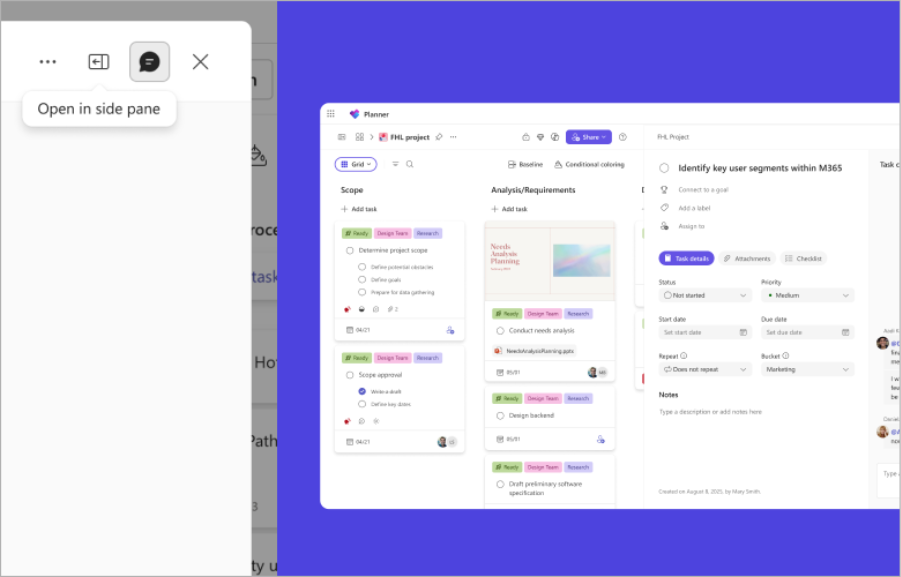
We are introducing a new task details side pane in Microsoft Planner that enables users to view and edit task details without leaving their Board, Grid, or My Tasks view. This update improves productivity by reducing context switching and allowing faster task updates.
This message is associated with Microsoft 365 Roadmap ID 566866.
[Rollout Schedule:]
General Availability (Worldwide): Rollout begins in late July 2026; expected to complete by mid-August 2026
[Impact on Your Organization:]
Who is affected: All users with access to Microsoft Planner
Platforms/Services:
- Planner on the web
- Planner in Microsoft Teams
What will happen:
- Users will be able to open and edit task details in a side pane while keeping their main view visible.
- Supported task fields include assignees, due dates, status, notes, checklists, and attachments.
- The system will remember each user’s preferred experience (side pane or dialog) across sessions.
- On smaller screens, the experience will automatically switch to dialog mode.
- Existing workflows remain unchanged; users can continue using the dialog experience if preferred.
- The feature will be enabled by default for all users.
Screenshot - The "Open in side pane" tooltip on a task details dialog, with the Planner Grid view visible behind it.
[Action Required/Recommendations:]
No admin action is required.
Recommended actions:
- Inform users about the new side pane experience to reduce confusion.
- Update internal training materials and documentation if applicable.
- Prepare helpdesk teams for potential user questions about the new experience.
[Compliance considerations:]
No compliance considerations identified, review as appropriate for your organization.
Additional details from Microsoft
- RoadmapIds
- 566866
- Summary
- Microsoft Planner will introduce a task details side pane by mid-August 2026, allowing users to view and edit tasks without leaving their main view. This feature, enabled by default on web and Teams, supports key task fields, remembers user preferences, and requires no admin action.
- Platforms
- Desktop, Mac, Web