
MC1422017 High
(Updated) Outlook for Mac: Paragraph options for composing emails
Summary AI-generated
Outlook for Mac adds enhanced paragraph formatting, offering improved alignment, indentation, and spacing controls for clearer, more professional emails.
Suggested actions AI-generated
- Inform users about enhanced formatting capabilities
- Update internal documentation if applicable
Written by Azure OpenAI (gpt-4.1) from the text of the post below. It can be incomplete or wrong; the original post is authoritative.
Similar posts
Search for more like this- MC1129129 (Updated) Outlook: Create and save email templates in the new Outlook for Windows
- MC1183298 (Updated) Updated compose toolbar and actions in Outlook Mobile
- MC1239932 (Updated) Collaborate with Copilot in Outlook while drafting email
- MC1245222 (Updated) Outlook: Share Word, Excel and PowerPoint local files via the new Outlook for Windows
- MC1247637 (Updated) Microsoft 365 Copilot: Draft and send Outlook email directly in Copilot Chat
- MC1470883 Microsoft Outlook for iPad: Minimize email drafts and return to them later
Original post from Microsoft
Updated July 21, 2026: We have updated the content. Thank you for your patience.
[What and Why:]
Outlook for Mac is introducing enhanced paragraph formatting options to improve email composition. This update provides users with greater control over alignment, indentation, and spacing, helping create clearer and more professional communications and improving overall productivity.
[Rollout Schedule:]
General Availability (Worldwide, GCC, GCC High, DoD): Rollout begins in mid-July 2026; expected to complete by late July 2026
[Impact on Your Organization:]
Who is affected: All users of Outlook for Mac
Platforms/Services: Outlook for Mac (desktop)
What will happen:
- Users will have access to richer paragraph formatting options while composing emails.
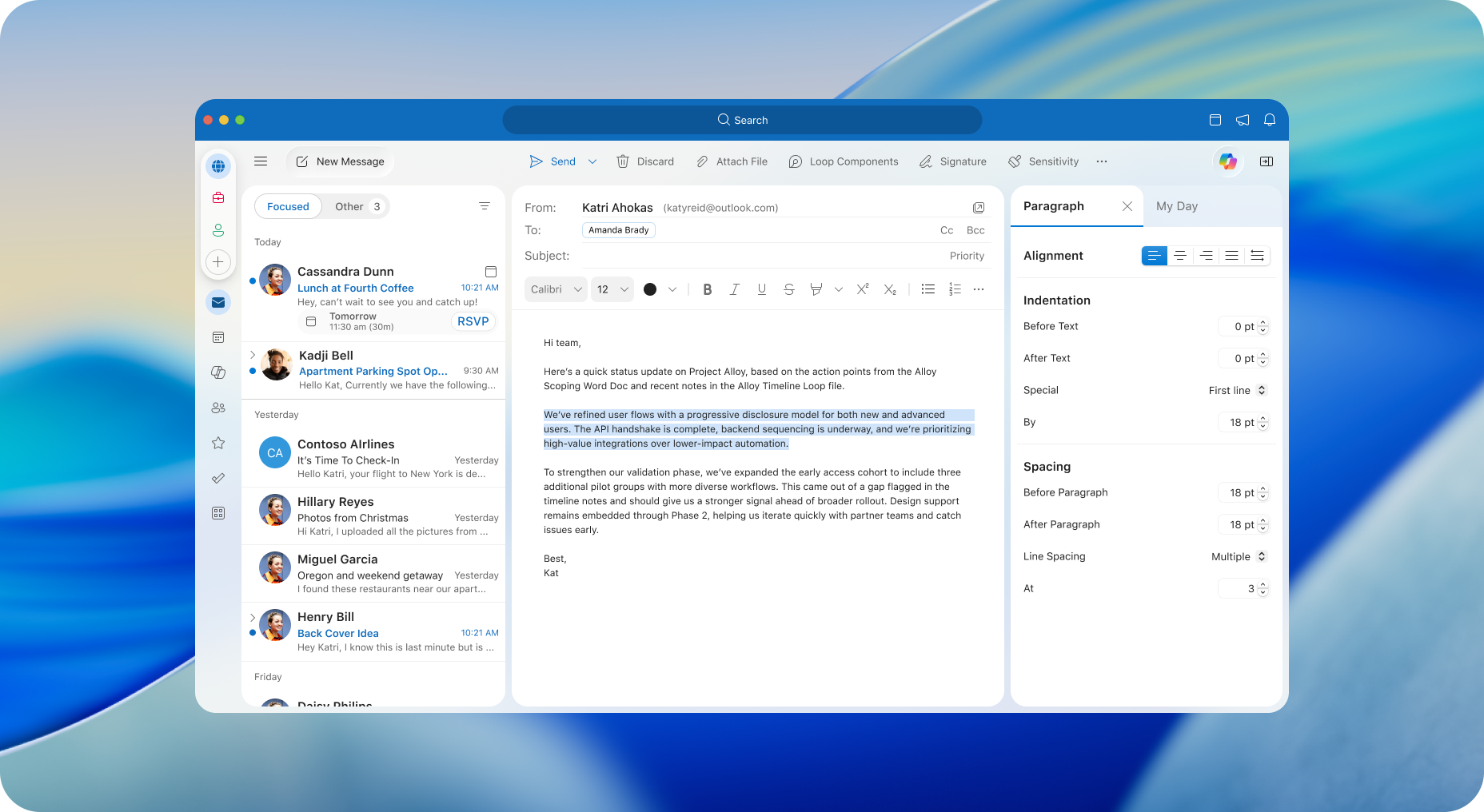
- A new Paragraph Options pane will be available from the line spacing menu.
- Users can adjust alignment, indentation, and spacing more precisely.
- The feature will be enabled by default.
- Existing formatting options will remain available and be extended.
Screenshot - New Paragraph Pane
[Action Required / Recommendations:]
- No action is required.
- Consider informing users about enhanced formatting capabilities.
- Update internal documentation if applicable.
[Compliance considerations:]
No compliance considerations identified, review as appropriate for your organization.
Additional details from Microsoft
- Summary
- Outlook for Mac will introduce enhanced paragraph formatting options, including a new Paragraph Options pane for precise alignment, indentation, and spacing control. The update, enabled by default, will roll out worldwide from mid to late July 2026, improving email composition without requiring user action.