← Back
(Updated) Microsoft 365 Copilot: Change in accessing additional agents in Excel
MC1287365 · build prod-20251231-200323
Category
stayInformed
Severity
normal
Major change
False
Last modified
2026-05-01 18:01:07
Summary source
Azure OpenAI (gpt-4.1)
Action by (Graph)
Action by (AI)
2026-04-22 00:00:00
Services
Microsoft 365 apps, Microsoft Copilot (Microsoft 365)
Tags
Updated message, New feature, User impact, Admin impact
Master tags
User, Admin, Copilot License
Roadmap IDs

One-line summary

Rollout of the updated chat-only Copilot experience in Excel is paused; users with Copilot licenses can soon access more Copilot agents via the Excel header menu when released.

Similar updates

More like this
MC1187799 (Updated) Microsoft Word, Excel, and PowerPoint agents: A new Copilot experience for content creation
(Updated) Microsoft Word, Excel, and PowerPoint agents: A new Copilot experience for content creation New Word, Excel, and PowerPoint Copilot agents will become available in Copilot Chat for licensed users, allowing creation and editing of documents, workbooks, and presentations via chat. [Introduction] We’re introducing new Word, Excel, and.
MC1187671 (Updated) New features coming to Microsoft 365 Copilot Chat for Outlook, Word, Excel, and PowerPoint
(Updated) New features coming to Microsoft 365 Copilot Chat for Outlook, Word, Excel, and PowerPoint Copilot Chat in Outlook expands reasoning to inbox, calendar, and meetings for users without a Copilot license; Agent Mode in Excel and Word now rolling out, Anthropic added as subprocessor. Updated March 11, 2026: Agent Mode in Excel and Word are.
MC1202968 Agent Mode in Excel for Windows and Mac
Agent Mode in Excel for Windows and Mac Agent Mode in Copilot for Excel enables users to use natural language to build, edit, and enrich workbooks, with web search and Claude AI support, rolling out by default from Jan 2026. [Introduction] Agent Mode in Microsoft 365 Copilot for Excel , available in Excel for Windows and Excel for Mac,.
MC1184408 Agent mode in Excel generally available soon (formerly part of the Frontier program)
Agent mode in Excel generally available soon (formerly part of the Frontier program) Agent mode in Excel, enabling AI-powered workbook editing and web search via Copilot, will be generally available by default to eligible users starting early December 2025. [When this will happen:] General Availability (Worldwide): Rollout will begin in early.
MC1184407 App Skills in Excel will be retired
App Skills in Excel will be retired App Skills in Excel will be retired and replaced by Agent Mode, streamlining Copilot features; rollout starts December 2025 and completes by February 2026. [Introduction] As part of ongoing improvements to the Microsoft 365 Copilot experience, App Skills in Excel will be retired. ...p Skills option will be.
MC1189000 (Updated) Updated UI for Copilot Chat entry point in Word, Excel and PowerPoint apps
(Updated) Updated UI for Copilot Chat entry point in Word, Excel and PowerPoint apps Microsoft 365 apps are updating Copilot with a unified UI, dynamic action button, contextual prompts, and new keyboard shortcuts for licensed users, rolling out from Dec 2025 to May 2026. [Introduction] We’re updating the Copilot experience in Microsoft 365 apps.

Details

Summary
The rollout of the updated Microsoft 365 Copilot feature in Excel, allowing access to additional agents via the "…" menu, is paused. Users can still use chat-only Copilot without changes. No admin action is needed; inform support teams and update documentation accordingly.

Body (from Message Center)

Updated May 1, 2026: We have paused rollout of this feature at this time. We will communicate via Message center when we are ready to proceed. We apologize for any inconvenience. 

[Introduction]

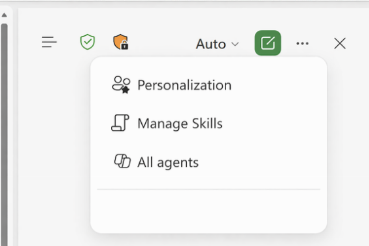
We are updating the Chat-only Copilot experience in Excel to better align with the editing experience. As part of this update, users who want to access additional Copilot agents (such as Researcher or Analyst) can do so by selecting the “…” menu in the header and choosing M365 Copilot.

[When this will happen]

  • General Availability (Worldwide): We will communicate via Message center when we are ready to proceed.

[How this affects your organization]

Who is affected

All Excel users with Microsoft 365 Copilot licenses

What will happen

  • Users can continue to use the chat‑only Copilot experience in Excel to ask questions, analyze data, and receive insights without modifying workbook content.
  • However, users who want to access additional Copilot agents (such as Researcher or Analyst) can do so by selecting the "…" menu in the Excel header and choosing M365 Copilot:

  • Existing Microsoft 365 Copilot licensing and policy controls are respected.
  • There is no change to workbook editing behavior or data permissions.

[What you can do to prepare]

No admin action is required.

  • Inform helpdesk and support teams about the new access path to Microsoft 365 Copilot from Excel.
  • Update internal documentation or training materials that describe Copilot experiences in Excel.
  • Review Microsoft 365 Copilot documentation if you want to understand available agents and licensing requirements.

Learn more: Edit with Copilot in Excel | Microsoft Support

[Compliance considerations]

No compliance considerations identified. Review as appropriate for your organization.

Raw JSON (for debugging)

Expand/collapse the full payload below.
Show/hide raw
{
  "snapshot_item": {
    "action_required_by": null,
    "ai_action_required_by": "2026-04-22T00:00:00Z",
    "ai_actions": [
      "Inform helpdesk/support about access path change",
      "Update documentation/training on Excel Copilot",
      "Review Copilot agent/licensing documentation"
    ],
    "ai_master_tags": [
      "User",
      "Admin",
      "Copilot License"
    ],
    "ai_model": "gpt-4.1",
    "ai_summary": "Rollout of the updated chat-only Copilot experience in Excel is paused; users with Copilot licenses can soon access more Copilot agents via the Excel header menu when released.",
    "ai_topics": [
      "Microsoft 365 Apps",
      "Copilot",
      "Excel"
    ],
    "category": "stayInformed",
    "details_map": {
      "Summary": "The rollout of the updated Microsoft 365 Copilot feature in Excel, allowing access to additional agents via the \"\u2026\" menu, is paused. Users can still use chat-only Copilot without changes. No admin action is needed; inform support teams and update documentation accordingly."
    },
    "id": "MC1287365",
    "importance": 4,
    "is_major_change": false,
    "last_modified": "2026-05-01T18:01:07Z",
    "ms_products": [
      "Microsoft 365 Apps",
      "Copilot"
    ],
    "platforms": null,
    "roadmap_ids": [],
    "services": [
      "Microsoft 365 apps",
      "Microsoft Copilot (Microsoft 365)"
    ],
    "severity": "normal",
    "tags": [
      "Updated message",
      "New feature",
      "User impact",
      "Admin impact"
    ],
    "title": "(Updated) Microsoft 365 Copilot: Change in accessing additional agents in Excel"
  }
}