
MC1156360 High
(Updated) Microsoft 365 Copilot: Copilot Chat for Teams Chats, Channels, Calling, and Meetings
Summary AI-generated
Copilot Chat is now available side-by-side in Teams Chats, Channels, Calling, and Meetings for users with a Microsoft 365 Copilot license, with new in-meeting controls for audio processing.
Suggested actions AI-generated
- Allow the Microsoft 365 Copilot app at the tenant level
- Review Teams app permission and app setup policies
- Confirm Copilot app is enabled and available for users
Written by Azure OpenAI (gpt-4.1) from the text of the post below. It can be incomplete or wrong; the original post is authoritative.
Similar posts
Search for more like this- MC1189001 (Updated) Microsoft 365 Copilot: Voice chat in Microsoft 365 Copilot
- MC1085684 (Updated) Realtime voice is now available in M365 Copilot Chat and M365 Copilot
- MC1260709 Microsoft Teams: Copilot PSTN audio announcements
- MC1250069 Power Apps - Public preview for Microsoft 365 Copilot chat in model-driven apps
- MC1250062 Power Apps - Public preview for Microsoft 365 Copilot chat in canvas apps
- MC1462461 Ask Copilot in Teams
Original post from Microsoft
Updated September 11, 2026: We have updated the content. Thank you for your patience.
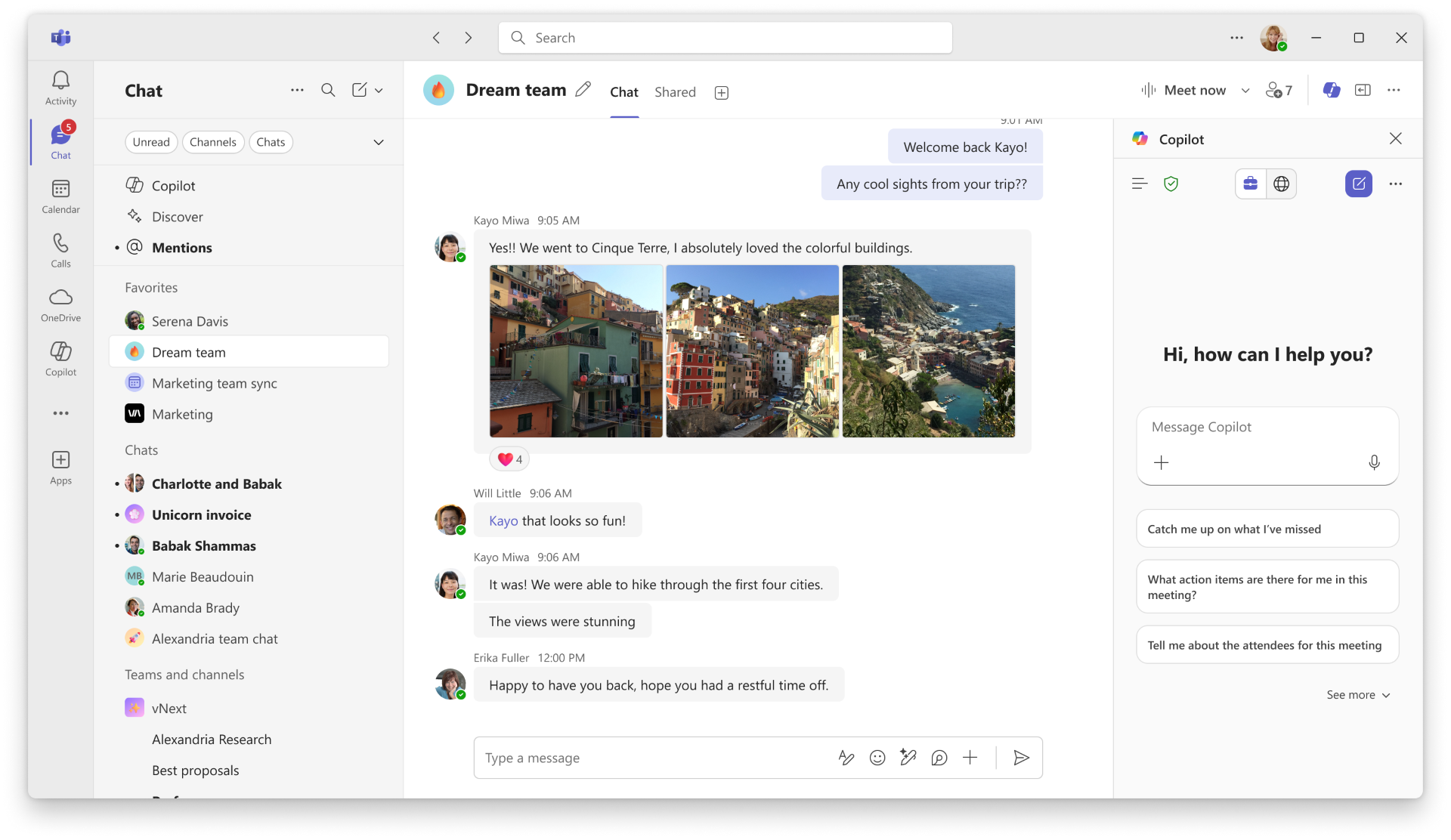
We’re excited to announce that we are making Copilot Chat available as a side-by-side experience in Teams. This will help users access the power of M365 and Web data in addition to current capabilities of Copilot in Chats, Channels, Calling, and Meeting. On Teams desktop (Windows and Mac) and web, users can open Copilot Chat from the Copilot icon located on the top right corner in these surfaces. Copilot Chat will be available in Teams for users with a Microsoft 365 Copilot license.
Additionally, a new in-meeting control lets users stop Teams from processing spoken audio during a meeting. When this control is on, Teams stops processing spoken audio — including transcription and recording — and Copilot will not use or reference anything said during this time. If Facilitator is active, it will also be turned off. Users will also be prevented from restarting recording, transcription, or Facilitator while this control is in effect.
This change is associated with Microsoft 365 Roadmap ID: 501107
Screenshot: Copilot Chat in Teams (Windows desktop) for users with a Microsoft 365 Copilot license. UI elements subject to change.
[When this will happen:]
Chats, Channels, and Post Meeting + Calling Recaps:
- Public Preview: Rollout of this change starts in early October and completes in the weeks following.
- General Availability: Rollout of this change starts mid-November and completes in the weeks following.
In-Meeting and in-Calls:
- Public Preview: Rollout of this change starts in early December and completes in the weeks following.
- General Availability: Rollout of this change started mid-January 2026 and completed early March 2026.
In-Meeting Control
- General Availability: Rollout of this change starts September 2026 (previously July) and is expected to complete in September 2026 (previously July).
- For more details, please see MC1319216
[How this affects your organization:]
Who is affected: Users with a Microsoft 365 Copilot license using Teams on Windows desktop, Mac desktop, or web (Chrome, Edge, Firefox, Safari).
What will happen:
- You can now create new Copilot Chat sessions or access other sessions within any conversation window. When you reopen Copilot Chat, it will always default back to the latest used session that was within the conversation window.
- Upon completion of the migration, all prior Copilot history will not be migrated into the new Copilot Chat experience. However, you can still access prior history by clicking on the More Options menu (…) located on the top right corner of your conversation window. An entry point to access history will be available within the More Options menu (...) of channel thread summaries as well. Within the menu, you find and select the View Copilot history option to access prior history.
Supported Platforms
Web
- Chrome
- Edge
- Firefox
- Safari
Desktop
- Windows
- Mac
[What you can do to prepare:]
Admin action required
To ensure Microsoft Copilot is available in Teams meetings, tenant administrators must allow the Microsoft 365 Copilot app.
If the Microsoft 365 Copilot app is not allowed at the tenant level, users may not see the Copilot entry point in Teams meetings, even when Copilot licenses are assigned.
Admins should review Teams app permission and app setup policies to confirm that the Microsoft 365 Copilot app is allowed for the intended users. Copilot availability in Teams meetings depends on both licensing and app enablement.
For more information, see the public documentation on managing Copilot access: https://learn.microsoft.com/copilot/manage
[Compliance considerations:]
| Compliance Area | Explanation |
|---|---|
| Does the change provide end users any new way of interacting with generative AI? | These capabilities were already available through Copilot Chat. This change extends Copilot Chat to new surfaces (Teams Chats, Channels, Calls, and Meetings). |
Additional details from Microsoft
- RoadmapIds
- 501107
- Summary
- Microsoft 365 Copilot Chat is now integrated side-by-side in Teams Chats, Channels, Calling, and Meetings for licensed users on desktop and web. New in-meeting controls allow stopping audio processing. Rollouts occur from October 2025 to September 2026. Admins must enable the Copilot app for access.
- Platforms
- Desktop, Mac, Web