One-line summary
Details
Body (from Message Center)
Updated August 28, 2026: We have updated the timeline. Thank you for your patience.
[What and why]
Microsoft is enhancing the signature editing experience in Outlook for iOS and Android by allowing users to insert images into email signatures directly from OneDrive, in addition to selecting images from their device photo library. This improvement makes it easier for users to access and use signature images stored in OneDrive while maintaining existing organizational data-sharing policies.
[Rollout schedule]
General Availability (Worldwide, GCC, GCC High, and DoD): Beginning in late September 2026 (previously late August) and expected to complete by late October 2026 (previously late September)
[Impact on your organization]
Who is affected
- Users of Outlook for iOS and Android who create or edit email signatures
Platforms and services
- Outlook for iOS
- Outlook for Android
What will happen
- Users will see a new option when inserting an image into an email signature:
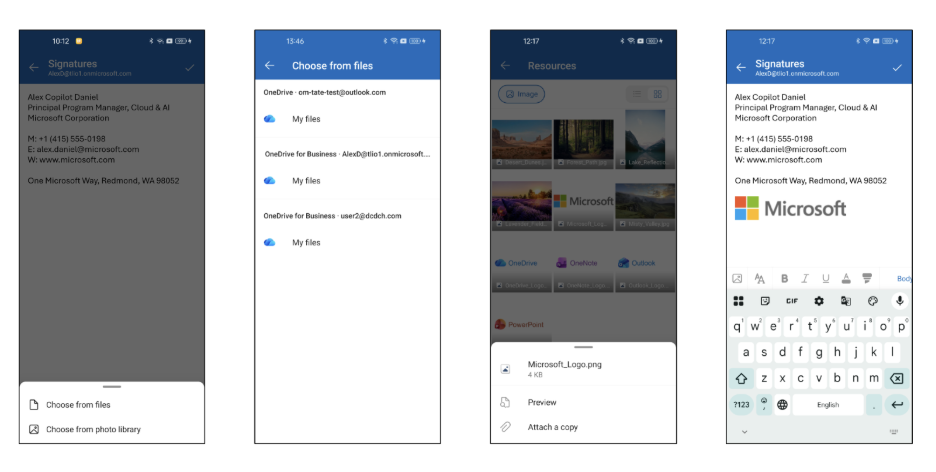
- Selecting Insert image in the signature editor will present:
- Choose from files to browse and select image files that are stored in OneDrive.
- Choose from photo library to select an image from the device, which remains the existing behavior.
- This change is only visible in Outlook for iOS and Android when editing email signatures. Users can select images stored in OneDrive, but there are no changes to the OneDrive application experience.
- Available OneDrive accounts are determined by your organization's existing cross-account data-sharing policies.
- The file picker displays only image files.
- Users can switch between grid and list views while browsing images.
- Selected images are downloaded and embedded into the signature, consistent with the current behavior for locally stored images.
- Existing signatures are not modified.
- The feature is enabled by default and does not require administrator configuration.
[Action required and recommendations]
No action is required. The update is enabled automatically.
We recommend that you:
- Inform helpdesk and support staff about the updated signature image selection experience.
- Update internal training materials or screenshots if they reference the signature editor workflow.
[Compliance considerations]
No compliance considerations identified. Review as appropriate for your organization.
Raw JSON (for debugging)
Show/hide raw
{
  "snapshot_item": {
    "action_required_by": null,
    "ai_action_required_by": "2026-08-24T00:00:00Z",
    "ai_actions": [
      "Inform helpdesk and support staff about new signature image selection.",
      "Update internal training materials or screenshots referencing signature editor workflow."
    ],
    "ai_master_tags": [
      "User",
      "Admin"
    ],
    "ai_model": "gpt-4.1",
    "ai_summary": "Outlook for iOS/Android users can soon insert signature images directly from OneDrive, in addition to device photos, enhancing image selection with no admin action needed.",
    "ai_topics": [
      "Exchange",
      "Outlook",
      "OneDrive"
    ],
    "category": "stayInformed",
    "details_map": {
      "Summary": "Starting late September to late October 2026, Outlook for iOS and Android will let users insert signature images from OneDrive as well as device photo libraries. This feature is enabled by default, requires no admin setup, and respects existing organizational data-sharing policies. No action is needed."
    },
    "id": "MC1437668",
    "importance": 4,
    "is_major_change": false,
    "last_modified": "2026-08-28T16:36:07Z",
    "ms_products": [
      "Exchange"
    ],
    "platforms": null,
    "roadmap_ids": [],
    "services": [
      "Exchange Online"
    ],
    "severity": "normal",
    "tags": [
      "Updated message",
      "New feature",
      "User impact",
      "Admin impact"
    ],
    "title": "(Updated) Microsoft Outlook for iOS and Android: Insert signature images from OneDrive"
  }
}